

Buying IT equipment in Ghana can feel simple until a cheap deal becomes costly. A laptop may look new, a router may power on, and a software key may activate once. Still, fake products can hide behind clean packaging and confident sellers. So how can you avoid fake IT equipment in Ghana when buying hardware or software?
Quick Answer
- You can avoid fake IT equipment by slowing down the buying process and checking every important detail before you pay. The safest path is to verify the seller, product model, serial number, warranty, software license, invoice, and after-sales support.
- Buy from a verified supplier
Choose a supplier with a real business address, clear contact details, and a proven record. Don’t rely only on WhatsApp photos, social media posts, or verbal promises. - Ask for exact model numbers
A vague description like “Core i7 laptop” is not enough. Request the exact model, generation, part number, warranty status, and included accessories. - Check serial numbers before payment
For laptops, servers, printers, and networking equipment, ask for the serial number or service tag. Then verify it through the manufacturer’s warranty checker. - Inspect the product physically
Look at the packaging, labels, charger, ports, screen, keyboard, and product finish. Poor printing, missing labels, and mismatched parts are serious warning signs. - Verify software licenses properly
Avoid random cheap software keys. Genuine business software should come with clear ownership, proper activation, and official account access. - Request proper documentation
Always collect an invoice, warranty details, delivery note, license certificate, and supplier contact information. These documents protect you after purchase. - Avoid unusually cheap deals
A price far below the market rate usually has a hidden problem. It may be fake, refurbished, stolen, unsupported, or wrongly licensed.
Table of contents
- What Counts as Fake IT Equipment?
- Why Fake IT Hardware and Software Are Risky
- Ghana-Specific Buying Risks You Should Understand
- How to Verify the Seller Before You Buy
- Hardware Verification Checklist Before Payment
- Software License Verification Checklist
- Red Flags That Suggest IT Equipment May Be Fake
- Safe Procurement Process for Businesses, Schools, and NGOs
- What to Check After Delivery
- What to Do If You Already Bought Fake IT Equipment
- Sample Questions to Ask Before Buying IT Equipment
- FAQs
- Conclusion
- Get Genuine IT Equipment
What Counts as Fake IT Equipment?
Fake IT equipment is not always an obvious copy with a strange logo. Many fake products look clean, professional, and convincing at first glance. The real problem often appears later, when the device fails, the warranty is rejected, or the software stops working.
- Counterfeit hardware
Some products copy the branding, packaging, and design of known manufacturers. They may look genuine, but the internal parts are poor quality, unsafe, or unsupported. - Refurbished devices sold as new
A refurbished laptop is not always bad. However, it becomes a problem when a seller hides its history and charges you for a brand-new product. - Grey-market equipment
Grey-market products may be genuine, but they enter the market through unofficial channels. That means you may not get local warranty, support, or replacement parts. - Fake-capacity storage devices
USB drives, memory cards, SSDs, and external hard drives can display fake storage sizes. A “2TB” drive may hold only a small amount of usable data. - Cloned or altered laptops
Some sellers change stickers, install used parts, or alter software details. The laptop may show attractive specifications, yet the hardware inside may tell another story. - Counterfeit printer cartridges and toners
Fake consumables often look similar to original products. However, they can leak, produce poor prints, and damage expensive office printers. - Pirated or unauthorised software
A software key may activate today and fail tomorrow. It may also come from a stolen, educational, trial, or volume-license source.
Why Fake IT Hardware and Software Are Risky
Fake IT products rarely fail quietly. They waste money, expose data, slow operations, and create stress for teams that depend on technology every day. For businesses, schools, NGOs, and government offices, one bad purchase can disrupt an entire workflow.
- They can expose your business data
Unlicensed software and tampered devices can introduce malware into your systems. BSA reports that organisations face a nearly one-in-three chance of encountering malware when they obtain or install unlicensed software. - They often lack proper warranty support
A fake or unsupported device may work for a few weeks. Once it fails, the manufacturer may reject the warranty because the serial number is invalid. - They increase long-term costs
Cheap fake equipment can quickly become expensive. Repairs, downtime, data recovery, replacement parts, and emergency purchases often cost more than buying genuine products in the first place. - They reduce staff productivity
Slow laptops, unstable routers, fake antivirus tools, and unreliable storage devices frustrate users. When staff spend time fixing equipment, real work suffers. - They can create compliance problems
Pirated software can expose organisations to legal and licensing issues. It can also make audits, renewals, and vendor support more difficult. - They can damage your network
Fake switches, routers, and firewalls are especially risky. These devices sit at the heart of your network, so poor-quality equipment can affect every connected user.
Ghana-Specific Buying Risks You Should Understand
Ghanaian buyers now purchase IT products through physical shops, online marketplaces, social media pages, WhatsApp groups, and informal referrals. That convenience is useful, but it also creates room for fake sellers, fake listings, and products with unclear sources.
Online Shopping Fraud Is a Real Buying Risk
Online shopping fraud is not just a general internet problem. It directly affects people buying laptops, printers, phones, routers, software, accessories, and office equipment. Ghana’s Cyber Security Authority recorded 266 online shopping fraud cases from January to October 2025, with losses of over GHS 600,000.
That statistic should change how you buy. A low price on social media may look exciting, but it deserves careful checking. Before sending money, confirm the seller’s business name, location, phone number, invoice policy, and delivery process. If the seller avoids clear answers, walk away.
Fake Business Listings Can Mislead Buyers
Some buyers search for a supplier online and call the first number they see. That can be risky because fraudsters now create fake online business listings. CSA recorded 54 fraudulent online business impersonation cases between January and April 2026, causing GHS 266,195 in losses.
For IT purchases, this matters a lot. A scammer can impersonate a laptop shop, software vendor, printer dealer, or networking supplier. Always compare the phone number with the company’s official website, known social pages, or verified business profile. Don’t trust one search result blindly.
Networking Devices Need Extra Attention
Routers, modems, access points, wireless devices, and telecom-related equipment need stronger checks. Ghana’s NCA states that type approval helps curb the circulation of counterfeit ICT devices.
This matters because networking devices affect security, performance, and connectivity. A poor-quality access point can slow down your office. A fake router can create security gaps. An unsupported firewall can fail when your business needs it most. Always ask whether communication equipment meets Ghana’s approval and safety expectations.
How to Verify the Seller Before You Buy
A genuine product can still become a bad purchase when the seller is unreliable. The seller should be easy to trace, willing to document the deal, and confident enough to share product details before payment. If they act secretly, your risk increases.
- Check the business identity
Look for a real company name, office address, phone number, website, and business profile. A seller who only uses a personal number may still be genuine, but you need stronger proof. - Review the seller’s online presence
Read reviews carefully and look for patterns. Too many generic five-star reviews, repeated wording, or a lack of real customer details can be suspicious. - Ask for a written quotation
A proper quotation should include brand, model, specifications, quantity, warranty, price, delivery terms, and payment terms. Vague quotations make disputes harder later. - Match payment details with the business
Be careful when a business invoice points to a personal mobile money account. Ask why the names differ before you send money. - Confirm after-sales support
A good seller explains how warranty claims work. They should also tell you who handles repairs, replacement, delivery issues, and technical support. - Test their product knowledge
Ask practical questions about compatibility, warranty, licensing, and setup. A serious supplier should answer clearly rather than rush you into paying.
Hardware Verification Checklist Before Payment
Hardware checks protect you from fake, refurbished, damaged, or unsupported equipment. You don’t need to become a technician, but you should know which details matter. A few minutes of checking can save your business from weeks of frustration.
Before paying for any laptop, router, printer, server, or storage device, use the checklist below to reduce the risk of buying fake or unsupported equipment.
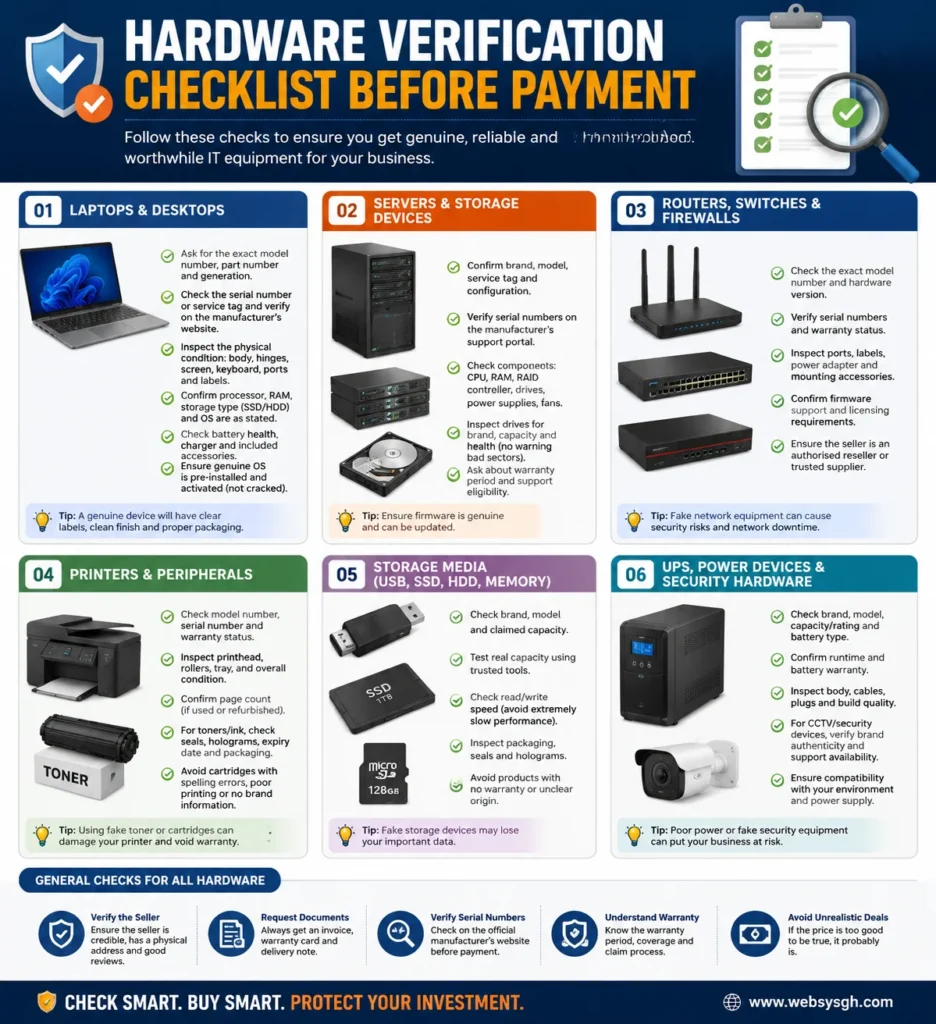
Use this hardware verification checklist to confirm serial numbers, warranty status, seller credibility, and product condition before buying IT equipment in Ghana.Laptops and Desktops
Start with the exact model number, service tag, or serial number. Check whether the processor generation matches the seller’s claim. Then inspect the screen, keyboard, battery, charger, ports, webcam, Wi-Fi, and storage health. A genuine-looking laptop can still contain replaced parts or a weak battery.
Don’t accept only “Core i5” or “Core i7” as a description. Those labels cover many generations and performance levels. Ask for RAM size, SSD type, battery condition, operating system status, and proof of warranty. Also, confirm whether the device is new, open-box, refurbished, or used.
Servers and Storage Devices
Servers require deeper verification because they support critical workloads. Confirm the brand, model, service tag, processor, RAM, RAID controller, drives, power supplies, rails, and support status. Also, ask whether the firmware is legitimate and updatable.
For SSDs, hard drives, memory cards, and USB drives, test real capacity and speed. The OECD found that counterfeit ICT goods accounted for as much as USD 143 billion in 2013, with an estimated 6.5% of ICT products traded worldwide being counterfeit. That global risk makes storage verification important, even for local buyers.
Routers, Switches, and Firewalls
Networking equipment should never be bought casually. Check serial numbers, firmware support, licensing requirements, power adapters, ports, model numbers, and reseller credibility. A switch that powers on is not automatically safe.
A major U.S. counterfeit Cisco case showed why this matters. The Department of Justice reported a large scheme involving counterfeit Cisco networking equipment, with USD 100 million in restitution agreed for Cisco. Fake network gear can reach serious environments, so Ghanaian buyers should verify before deployment.
Printers, Toners, and Office Peripherals
Printers and consumables can quietly drain your budget. Check the printer’s serial number, warranty status, page count, included accessories, and supported cartridge models. For toners, inspect packaging, labels, seals, print quality, and supplier credibility.
Read more: Office IT Setup Checklist in Ghana: Laptops, Network, Printers, Security & Software
UPS, Power Devices, and Security Hardware
Power equipment matters in Ghana because voltage issues can damage expensive devices. Check UPS capacity, battery condition, warranty, runtime claims, plug type, and replacement battery availability. Don’t buy a UPS only because the box shows a large number.
For CCTV, biometric devices, access control, and NVR systems, confirm brand authenticity and support. Security hardware protects your premises, so fake equipment creates both technical and safety risks.
Software License Verification Checklist
Fake software can look harmless because nothing physical breaks immediately. The key may activate, the dashboard may open, and users may continue working. However, weak licensing can expose your business to malware, account loss, audits, and sudden service disruption.
Avoid Extremely Cheap Software Keys
Very cheap license keys should raise concern. Many come from unauthorised resellers, stolen accounts, educational programs, or volume licenses. They may activate briefly, then stop working after the original owner reports abuse.
This is common with Windows, Microsoft 365, Adobe tools, antivirus software, design tools, and business applications. If the price looks unreal, ask why. Genuine software has a licensing cost because it includes updates, support, security patches, and legal usage rights.
Confirm the License Type
Ask whether the license is retail, OEM, subscription, volume, trial, or educational. Each type has different rules. A license intended for a single device, school, or company may not suit your business.
Don’t let a seller confuse you with technical words. Ask simple questions. Can your company own the license? Can you renew it? Can you transfer it? Will you control the admin account? These answers matter more than a quick activation screen.
Make Sure Your Business Owns the Account
For cloud software, ownership matters. Microsoft 365, Google Workspace, antivirus dashboards, backup tools, and ERP systems should not sit under the reseller’s private account. Your organisation should control the admin login, billing access, recovery email, and user permissions.
Without ownership, you may lose access when the reseller disappears. You may also struggle to remove users, reset passwords, renew subscriptions, or recover business data. Always request a proper admin transfer before paying fully.
Check Activation and Documentation
A genuine software purchase should include proper documentation. Ask for the license certificate, subscription details, invoice, activation instructions, and renewal terms. If the seller only sends a random key through WhatsApp, be careful.
Also, avoid pre-installed software on “new” laptops when the seller cannot explain the license. A laptop with cracked software may seem convenient today. Later, it can trigger security warnings, block updates, and expose malware.
Red Flags That Suggest IT Equipment May Be Fake
Warning signs usually appear before the money leaves your hand. The problem is that many buyers ignore them because the price feels attractive. When several red flags appear together, treat the deal like a trap.
- The price is far below the normal market range
A discount is normal, but a huge price gap needs explanation. Fake, stolen, refurbished, or unsupported products often hide behind “limited offer” language. - The seller refuses to share serial numbers
A serious supplier should not fear reasonable verification. If they keep avoiding serial numbers, warranty details, or exact models, pause the purchase. - The quotation lacks clear specifications
“HP laptop, 8GB RAM, 512GB” is not enough for business buying. You need model numbers, processor generation, storage type, warranty, and included accessories. - The seller pressures you to pay quickly
Scammers love urgency because it reduces careful thinking. Any seller who says “pay now or lose it” deserves extra checking. - There is no proper invoice or warranty
A verbal warranty does not protect your organisation. Get written warranty terms, supplier details, product details, and payment records. - The product packaging looks poor
Watch for blurry printing, spelling errors, weak seals, faded labels, and mismatched colours. Packaging is not proof alone, but poor packaging is a warning. - The software key has no ownership trail
A key without a vendor account, invoice, or license type can become useless. Business software should be traceable and renewable. - The product details don’t match the manufacturer’s website
Compare ports, specs, charger type, model design, and warranty information. Small mismatches can reveal a larger problem.
Safe Procurement Process for Businesses, Schools, and NGOs
Organisations should not buy IT equipment the same way someone buys a personal accessory. Business technology supports staff, customers, records, finance, security, and communication. A simple procurement process keeps decisions clean and protects the organisation.
Define What You Actually Need
Start with the job the equipment must perform. A school may need durable laptops and projectors. A clinic may need reliable desktops, backup storage, and antivirus software. A growing office may need switches, firewalls, access points, and licensed productivity tools.
Clear requirements reduce waste. They also stop sellers from pushing whatever they have in stock. Write down the purpose, quantity, performance needs, software requirements, warranty expectations, and budget range before requesting prices.
Request Detailed Quotations
Ask at least two or three suppliers for written quotes. Each quote should list exact brands, model numbers, specifications, warranty periods, delivery terms, setup costs, and payment terms. This makes comparison fair and reduces hidden surprises.
Don’t compare only the final price. One supplier may include warranty, setup, and genuine licenses. Another may offer a cheaper figure but exclude support. The cheapest quote can become the most expensive after delivery.
Verify Before Approval
Before approving payment, verify serial numbers, software terms, supplier identity, and support arrangements. Check whether the devices match your technical needs. Also, confirm compatibility with your current network, printers, software, and power setup.
For bigger purchases, involve an IT professional before signing. That extra step protects non-technical managers from confusing product descriptions. It also prevents overbuying, underbuying, or buying products that don’t fit the environment.
Inspect Before Final Acceptance
Delivery should not mean automatic acceptance. Match every item against the quotation. Check serial numbers, quantities, accessories, condition, warranty documents, license certificates, and invoice details.
Then test key functions. Turn on laptops, test Wi-Fi, inspect screens, check keyboards, activate software, and confirm storage. For networking equipment, test firmware, ports, and configuration access before deployment.
What to Check After Delivery
Delivery day is your last strong checkpoint. Once products enter daily use, disputes become harder to resolve. A clear acceptance checklist helps your team spot problems before the supplier considers the order complete.
- Match products against the quotation
Check every model, quantity, specification, and accessory. Don’t accept substitutions unless your team approves them in writing. - Record serial numbers immediately
Create an asset register with serial numbers, warranty dates, locations, and assigned users. This helps with support, insurance, and future audits. - Test the physical condition
Look for scratches, dents, loose ports, damaged screens, weak hinges, and missing screws. New products should not look tired. - Check the software activation properly
Make sure the software is licensed under your organisation’s account. Don’t accept temporary activation as proof of genuine ownership. - Run basic diagnostics
Test battery, storage health, memory, display, camera, keyboard, Wi-Fi, Bluetooth, and charger. For servers, check drives, fans, RAID, and power supplies. - Keep all documents together
Save invoices, warranty cards, delivery notes, license certificates, support contacts, and product photos. Good records make warranty claims easier.
What to Do If You Already Bought Fake IT Equipment
Discovering a counterfeit product can be frustrating, but quick action can reduce the damage. Don’t keep using suspicious equipment for sensitive work. Treat it as a possible security and financial risk until you know more.
- Stop using it for sensitive data
Disconnect the device from business systems if you suspect tampering. Avoid logging into banking, email, cloud, or admin accounts. - Document everything clearly
Keep receipts, chat records, call records, proof of payment, packaging photos, serial numbers, and delivery details. Evidence helps when reporting or requesting a refund. - Scan for malware
Use trusted security tools to check laptops, storage drives, and software installations. Avoid copying unknown files into your main network. - Contact the seller in writing
Ask for a replacement, refund, or proof of authenticity. Written communication creates a record if the matter escalates. - Report suspected online fraud
If the deal involved deception, impersonation, or non-delivery, report it through Ghana’s Cyber Security Authority channels. CSA regularly warns buyers about online shopping fraud and related scams. - Review your buying process
After resolving the issue, update your IT procurement steps. One bad experience can help your organisation avoid bigger losses later.
Sample Questions to Ask Before Buying IT Equipment
Good questions make weak sellers uncomfortable and serious suppliers more helpful. Use these questions before you approve any hardware or software purchase. They are simple, practical, and useful for both small and large orders.
- Is the product brand new, refurbished, used, or open-box?
Ask this directly because sellers sometimes avoid clear condition labels. A refurbished product may be acceptable, but it should be priced and described honestly. - What is the exact model number and part number?
This prevents confusion between similar products. It also helps you compare the quote with manufacturer specifications. - Can you provide the serial number before payment?
Serial numbers help you verify warranty and authenticity. If the seller refuses, ask for a clear reason. - Who handles warranty claims after purchase?
Some warranties are manufacturer-backed. Others are only seller promises. You need to know who takes responsibility. - Is the software license retail, OEM, subscription, or volume?
Each license type has different rules. Your business should not pay for a license it cannot legally use. - Will our organisation own the software admin account?
This matters for Microsoft 365, Google Workspace, antivirus, backup tools, and ERP systems. Admin ownership protects long-term access. - Can we inspect the products before final payment?
Inspection helps prevent disputes. If full inspection is impossible, agree on an acceptance process before delivery. - Do you provide invoices, warranty, and delivery documents?
Proper documents protect your purchase. They also help with accounting, asset tracking, and future warranty claims.
FAQs
Check the exact model, serial number, warranty status, charger, battery health, and BIOS details. Also, compare the specifications with the manufacturer’s official product information.
Not always. Many cheap keys come from unauthorised sources. Buy from official or trusted suppliers, and ensure your business owns the license account.
Grey-market equipment may be genuine, but it enters the market through unofficial channels. It can lack local warranty, proper support, replacement parts, or approved distribution records.
You can, but verify everything first. Check the seller’s business identity, invoice policy, reviews, location, warranty terms, and payment details before sending money.
You can, but verify everything first. Check the seller’s business identity, invoice policy, reviews, location, warranty terms, and payment details before sending money.
Check the serial number, model number, firmware support, warranty status, licensing needs, and supplier credibility. For communication devices, consider NCA-related approval requirements.
Keep the invoice, delivery note, warranty card, license certificate, serial numbers, product photos, and supplier contact details. These records help with claims and audits.
Yes. Fake or unlicensed software can expose systems to malware, missing updates, blocked support, and data loss. It can also create licensing and compliance problems.
Verbal promises are hard to prove later. Always request written warranty terms, supplier details, product serial numbers, and the repair or replacement process.
Conclusion
Avoiding fake IT equipment in Ghana starts with careful buying habits. Don’t rush because a seller offers a tempting price. First, verify the supplier’s identity, request the exact model numbers, check the serial numbers, confirm the warranty status, and inspect the product before acceptance. For software, make sure the license is genuine, renewable, and owned by your organisation. Also, keep proper invoices, warranty documents, delivery notes, and license certificates, as they will protect you later.
Fake hardware and software can cost more than money. They can expose your data, slow your team, damage your network, and disrupt daily work. When your business needs genuine IT hardware or software, WebSys Technology can help you source reliable equipment through a safer procurement process.
Request a procurement quote from us and get expert support before you spend money on equipment your business depends on.
GET IN TOUCH