
Technology spending can grow faster than many businesses expect. A simple laptop purchase can quickly add up to include software licenses, networking tools, backup systems, warranties, and setup support. Without a clear budget, you may overspend or miss important items. So, how much should you budget for IT procurement costs in Ghana?
Quick Answer
- IT procurement cost in Ghana varies widely based on user needs, hardware type, and business size.
- Understand budget ranges: under GHS 5,000 for small upgrades, and over GHS 100,000 for larger infrastructures.
- Consider hidden costs like installation, software renewals, and staff training in procurement planning.
- Strategically plan device lifecycles and avoid poor-quality equipment to reduce long-term costs.
- For reliable cost of IT procurement, planning and working with experienced providers like WebSys Technology is essential.
Table of contents
- What Determines the Cost of IT Procurement in Ghana?
- General IT Procurement Budget Ranges in Ghana
- Laptop and Desktop Procurement Cost Planning
- Server and Storage Procurement Cost Planning
- Networking Equipment Budget Guide
- Software Licensing Cost Breakdown
- Hidden IT Procurement Costs Businesses Often Miss
- Budget Examples by Business Type
- How to Reduce IT Procurement Cost Without Buying Poor Equipment
- FAQs
- Conclusion
- Get a Tailored IT Procurement Quote
What Determines the Cost of IT Procurement in Ghana?
The cost of IT procurement is never one fixed number. Two companies can buy “office equipment” and still spend very different amounts. The final budget depends on user needs, product quality, software licensing, installation work, warranty terms, and the business’s expected growth.
- Number of users
More users mean more laptops, desktops, accounts, software licenses, and support needs. Even a small increase in staff can change the budget because every user needs tools to work properly. - Hardware type and quality
Business-grade laptops, servers, switches, and firewalls usually cost more than consumer products. However, they often last longer, perform better, and handle daily office pressure more reliably. - Software licensing needs
Software can become a major recurring cost. Microsoft 365, antivirus software, accounting tools, ERP systems, backup software, and cloud storage usually require monthly or annual renewals. - Networking complexity
A simple office may only need a router and an access point. Larger offices may need managed switches, firewalls, cabling, Wi-Fi planning, VPN access, and internet redundancy. - Installation and configuration
Buying equipment is only one part of the cost. You may also need setup, migration, testing, security configuration, user accounts, and staff onboarding. - Warranty and support
Longer warranties and proper support increase upfront cost. Still, they reduce panic later when equipment fails during busy workdays. - Future scalability
Cheap equipment can become expensive when it cannot grow with the business. A smart budget leaves room for extra users, devices, storage, and software upgrades.
General IT Procurement Budget Ranges in Ghana
Budget ranges help you plan with more confidence. They don’t represent fixed market prices because products, brands, exchange rates, and specifications change often. However, they give you a practical starting point before requesting quotations.
Use these general budget ranges as a planning guide before requesting quotes for laptops, servers, networking equipment, software, and support.
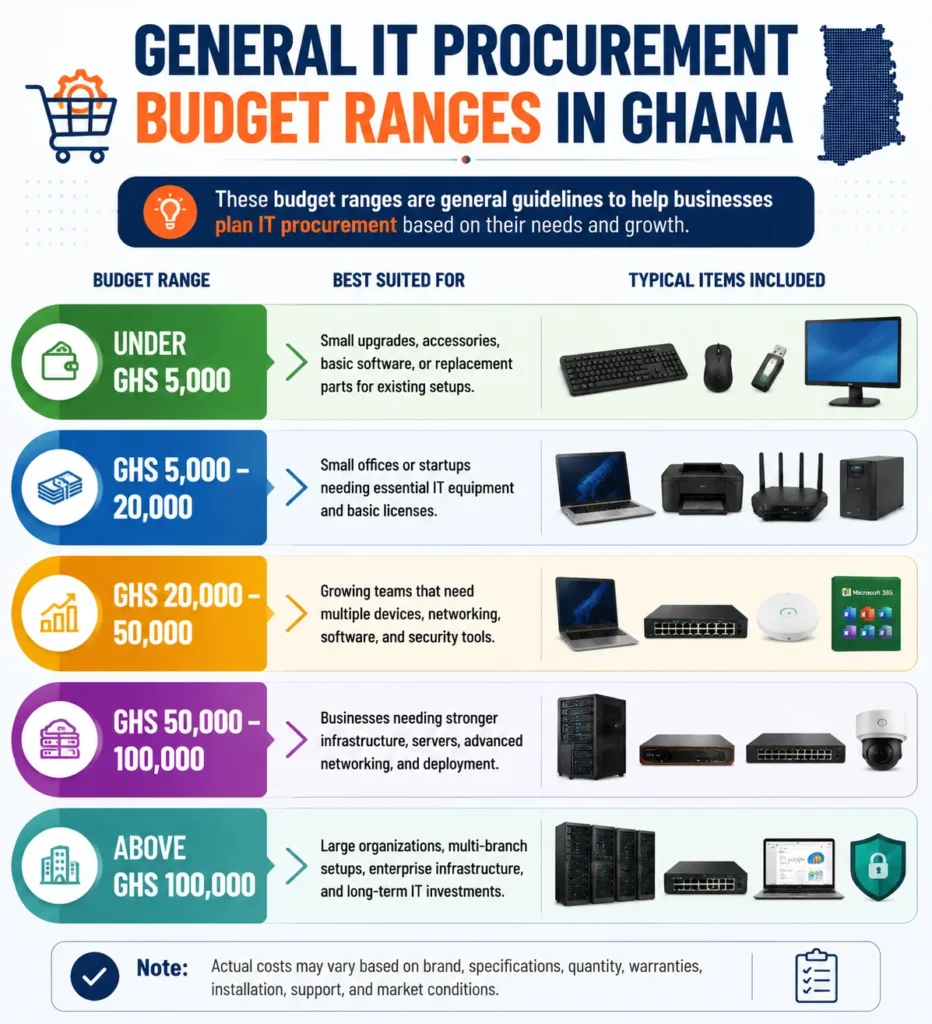
A simple budget guide showing common IT procurement ranges in Ghana for small upgrades, office devices, networking, servers, software, and enterprise infrastructure.Under GHS 5,000
This budget works best for small improvements rather than full office procurement. You may buy accessories, basic storage, simple software, a monitor, a UPS, replacement parts, or low-cost peripherals. It can also cover urgent fixes when one device affects daily work.
However, this range may not support quality business laptops or bigger networking upgrades. If your team needs several devices, treat this as a starter budget. It helps with small gaps, but it rarely solves wider IT needs.
GHS 5,000–20,000
This range suits small businesses, freelancers, startups, and offices with limited equipment needs. You may procure one or more laptops, desktops, printers, UPS devices, basic networking tools, and essential software licenses. It gives you enough room to build a functional setup.
Still, careful planning matters. A stronger laptop with a warranty may cost more upfront, but it can save money over time. Don’t spend the whole budget on hardware and forget antivirus, Microsoft 365, backup, or installation.
GHS 20,000–50,000
This range works well for growing offices with multiple users. You can plan for business laptops, desktops, printers, switches, routers, backup devices, licensed software, and basic security tools. It also gives space for setup and configuration.
At this level, standardisation becomes important. Buying similar laptop models, matching accessories, and consistent licenses makes support easier. It also helps your team avoid compatibility issues later.
GHS 50,000–100,000
This range suits businesses that need more robust infrastructure. It may include servers, storage, firewalls, managed switches, structured cabling, access points, endpoint protection, and installation support. Companies with more users often need this level of planning.
The real value here comes from design. A poorly planned network wastes money even with good hardware. Before buying, confirm user count, growth plans, software needs, data backup, security risks, and branch connectivity.
Above GHS 100,000
Large organisations, schools, hospitals, NGOs, and multi-branch businesses often need higher budgets. These projects can include enterprise servers, advanced firewalls, full network upgrades, backup systems, cloud services, security licensing, and deployment support across locations.
At this stage, procurement becomes a business decision, not just an IT purchase. You need clear specifications, vendor comparison, warranty planning, project timelines, and long-term support. One wrong decision can affect many users.
Laptop and Desktop Procurement Cost Planning
Laptops and desktops usually account for a large share of IT budgets. Every employee needs the right device for daily work, but not everyone needs the most expensive machine. Good planning matches device performance with real job roles.
- Entry-level office devices
These devices suit email, browsing, documents, spreadsheets, and simple admin work. They should still have enough memory, fast storage, and reliable build quality for daily use. - Mid-range business laptops
Most managers, accountants, sales teams, and office staff work better with mid-range devices. These laptops support multitasking, video calls, cloud apps, and office software without constant slowdowns. - High-performance workstations
Designers, developers, engineers, editors, and data-heavy teams need stronger processors, more memory, and better graphics. Buying low-quality devices for these roles leads to frustration and lost productivity. - Desktop computers
Desktops can offer strong value for fixed office workstations. They suit reception desks, labs, call centres, finance teams, and users who don’t need mobility. - Accessories and add-ons
Monitors, docking stations, laptop bags, external keyboards, mice, webcams, and headsets often get forgotten. These items improve comfort and productivity, especially for hybrid teams. - Warranty and replacement planning
Business devices should not be treated as one-time purchases. Plan replacement cycles, battery ageing, spare chargers, and warranty coverage before devices start failing.
Server and Storage Procurement Cost Planning
Server and storage purchases require careful consideration because they support critical business systems. A server may run files, databases, backups, accounting software, ERP tools, or internal applications. When it fails, many users can stop working.
Small Business Server Budget
A small business server may support file sharing, user access, backups, and simple applications. It does not always need enterprise-level power, but it should offer reliable storage, proper backup, and room for growth. Cutting corners here can create serious downtime later.
You should also consider licensing, UPS protection, antivirus software, and backup drives. The server box alone is not the full cost. A useful server setup includes hardware, software, security, configuration, and recovery planning.
Enterprise Server Budget
Enterprise server projects require more powerful processors, larger memory capacity, redundant storage, multiple power supplies, and proper rack systems. These systems often support databases, ERP software, virtualisation, internal apps, and branch operations. They need more planning than ordinary office hardware.
A larger server budget should include support contracts and disaster recovery. If the server supports critical work, downtime becomes expensive. That’s why redundancy, backup, monitoring, and skilled setup matter.
Cloud vs On-Premise Cost Comparison
Cloud services reduce upfront hardware spending because you pay monthly or yearly. They can suit businesses that want flexibility, remote access, and faster scaling. However, recurring costs can grow as users, storage, and services increase.
On-premises servers require more upfront investment, but they may suit businesses that need local control. They also need power backup, cooling, maintenance, licenses, and technical support. The right choice depends on workload, budget, security, and growth plans.
Hidden Server Costs
Server costs often get buried in the main quotation. You may need racks, UPS units, cooling, backup software, Windows Server licenses, antivirus, storage drives, and professional configuration. These items can quickly change the total budget.
Don’t forget data migration either. Moving files, users, databases, and applications takes planning. If the migration goes badly, your team may lose time, access, or important records.
Networking Equipment Budget Guide
Networking equipment affects every device inside your business. When the network is weak, even good laptops and software feel slow. A strong budget should cover internet access, Wi-Fi coverage, switching, firewalls, cabling, and future expansion.
- Routers and firewalls
A basic router may work for a small office, but growing businesses need stronger security. Firewalls support VPN access, filtering, threat protection, and safer internet use. - Switches
Switches connect computers, printers, access points, servers, and other devices. Managed switches cost more, but they offer better control, monitoring, segmentation, and troubleshooting. - Wi-Fi access points
One router cannot serve every office properly. Larger spaces need planned access points, proper placement, and enough capacity for staff, visitors, and mobile devices. - Structured cabling
Good cabling makes networks stable and easier to manage. Cat6 cables, patch panels, trunking, cabinets, and labour can affect the final budget. - Internet redundancy
Many Ghanaian businesses need a backup internet connection because downtime disrupts operations. A dual-ISP setup can keep teams working when one connection fails. - VPN and branch connectivity
Multi-branch organisations may need secure links between offices. VPNs, firewalls, and centralised policies help teams share systems safely.
Software Licensing Cost Breakdown
Software costs can surprise businesses because many tools now use subscriptions. You may pay per user, per device, per month, or per year. That makes software planning just as important as hardware planning.
Microsoft 365 Budget Planning
Microsoft 365 costs depend on the number of users and the plan type. Some teams only need email and cloud storage, while others need desktop Office apps, security features, and device management. Choosing the wrong plan can waste money every month.
Plan based on staff roles. Not every user needs the same license. Admin staff, managers, field workers, and executives may need different features. Matching licenses to work roles helps control recurring costs.
Antivirus and Endpoint Protection Costs
Basic antivirus software may suit a home user, but businesses need managed protection. Centralised endpoint security helps monitor devices, update protection, and respond faster to threats. The cost usually depends on devices or users.
Stronger cybersecurity tools cost more, yet they reduce serious risks. A ransomware attack, data loss, or compromised email account can cost far more than proper protection. Security should be included in the procurement budget from day one.
ERP and Accounting Software Costs
Accounting software, ERP systems, and business applications vary widely in cost. A small company may need simple accounting software. A larger business may need inventory, HR, finance, sales, and reporting tools together.
Implementation can cost as much as licensing in some cases. Setup, customisation, user training, data migration, and support all affect the real budget. Don’t budget only for software licenses.
Backup and Cloud Storage Costs
Cloud storage looks cheap at first, but costs increase with data volume. Businesses need to consider storage size, user access, backup frequency, retention period, and recovery needs. A proper backup plan protects against mistakes, theft, malware, and hardware failure.
OneDrive, Google Drive, NAS devices, and cloud backup tools all have different roles. The best choice depends on how your team creates, shares, and protects files.
Hidden IT Procurement Costs Businesses Often Miss
Hidden costs often appear after the main purchase. They can make a “cheap” procurement decision feel expensive later. When you budget properly, you protect your team from surprise expenses and rushed emergency purchases.
- Delivery and logistics
Equipment delivery can increase costs, especially for regional offices. Larger items like servers, UPS units, racks, and printers may need careful handling. - Installation and setup
Devices need to be configured before users can work smoothly. Software installation, email setup, network access, printer mapping, and security settings all take time. - Software renewals
Many licenses renew every month or year. If you forget renewals, users may lose access to email, antivirus, backups, or business applications. - Warranty extensions
An extended warranty adds cost, but it can reduce repair stress later. This matters for laptops, servers, printers, and networking equipment. - Data migration
Moving files, emails, software data, and user profiles can be time-consuming. Poor migration can cause confusion, missing files, and delayed work. - Staff training
New tools only help when people know how to use them. Training reduces mistakes, support calls, and staff resistance. - Downtime costs
Downtime does not always appear on a supplier quote. However, every hour of broken systems can affect sales, service, communication, and customer trust. - Future upgrades
A system that barely meets today’s needs may fail tomorrow. Budget for extra storage, more users, faster internet, and stronger security as you grow.
Budget Examples by Business Type
Different organisations need different procurement plans. A school, clinic, startup, and multi-branch company cannot use the same budget logic. The best budget starts with daily operations, user needs, and the risks of downtime.
Small Office
A small office may need laptops, a printer, a router, antivirus software, Microsoft 365, and backup storage. The budget should focus on reliable daily work rather than flashy specifications. Staff need a smooth email, document editing, printing, calls, and secure file access.
This setup can often start modestly. However, it should still include genuine software and warranty-backed devices. Cheap, unsupported products can hurt a small office quickly because there may be no backup equipment.
School or Training Centre
Schools often need computer labs, projectors, printers, Wi-Fi, content filtering, and learning software. Devices must handle frequent use by many students, so durability matters. A weak setup can create constant repairs and class disruptions.
Budgeting should include maintenance and replacement plans. Student devices face more wear and tear than normal office laptops. Also consider backup power, internet control, and safe access management.
Clinic or Healthcare Facility
Clinics need dependable devices because patient records and appointments require accuracy. Desktops, laptops, printers, UPS units, secure Wi-Fi, backups, and antivirus software should sit inside the budget. Reliability matters more than cosmetic features here.
Security also matters strongly in healthcare settings. Devices may handle sensitive patient information, so access control and backups need attention. A cheap device with poor security can create bigger problems later.
Growing Company
A growing company may need servers, managed Wi-Fi, structured cabling, cloud tools, firewalls, and business software. Growth creates pressure because new staff need quick onboarding. Weak planning can turn every new hire into a small IT crisis.
This budget should support scalability. Choose systems that allow more users, more storage, and better security later. Growth-friendly procurement avoids constant replacement.
Multi-Branch Organisation
A multi-branch organisation needs centralised control and secure connectivity. Budgets may include firewalls, VPNs, servers, endpoint management, backup systems, and support contracts. Branch offices also need consistent hardware standards.
Standardisation saves money over time. When every branch uses different devices, support becomes messy. A central procurement plan keeps systems cleaner and easier to manage.
How to Reduce IT Procurement Cost Without Buying Poor Equipment
Reducing cost does not mean buying the cheapest items. Smart savings come from choosing the right products, avoiding waste, and planning purchases before problems become urgent. Good procurement saves money without weakening performance.
Standardise Hardware Models
Using similar laptop and desktop models makes support easier. Your team can keep common chargers, spare parts, images, and drivers ready. This reduces troubleshooting time and improves replacement planning.
Standardisation also helps with bulk buying. Suppliers may offer better value when you order the same models consistently. Even small businesses can benefit from fewer device types.
Buy Based on Employee Roles
Not every employee needs a high-performance laptop. Match devices to actual work. Admin staff, designers, accountants, developers, and field teams often need different specifications.
This approach prevents overspending. It also prevents underbuying for staff who need stronger machines. A role-based device plan keeps budgets balanced and practical.
Bundle Procurement Projects
Buying items one by one can increase costs. Bundling laptops, software, accessories, networking, and support may create better pricing and smoother deployment. It also helps you compare supplier offers more clearly.
Bundling also improves planning. You see the full project cost instead of scattered expenses. That makes approval easier for managers and finance teams.
Use Cloud Services Strategically
Cloud services can reduce upfront infrastructure costs. They work well for email, storage, collaboration, backup, and some business applications. However, they still need careful subscription management.
Review cloud licenses regularly. Remove inactive users, match plans to roles, and avoid paying for unused features. Small monthly waste becomes large yearly waste.
Plan Device Lifecycles Properly
Every device has a useful working life. Laptops, desktops, servers, printers, and batteries all age. A planned replacement cycle avoids sudden breakdowns and emergency purchases.
Lifecycle planning also improves budgeting. Instead of replacing everything at once, you can spread spending across months or years. That keeps cash flow healthier.
Avoid Fake or Grey-Market Products
Fake and unsupported products may look cheaper at first. Later, they can lead to warranty issues, downtime, security issues, and replacement costs. Genuine equipment is usually safer for business use.
Always check serial numbers, warranty status, supplier reputation, and documentation. A low price means little if the product fails when your team needs it.
FAQs
IT procurement cost in Ghana can range from under GHS 5,000 to above GHS 100,000. The final budget depends on users, hardware, software, networking, setup, and support.
A small business may start around GHS 5,000–20,000 for basic devices and software. Growing teams may need GHS 20,000–50,000 to complete an office setup.
Servers need stronger hardware, storage, licenses, backup, power protection, and technical setup. They support many users, so reliability and redundancy increase the total cost.
Yes, software licensing should be part of IT procurement planning. Microsoft 365, antivirus, accounting tools, backup software, and business applications often require recurring payments.
Yes, warranties protect your equipment investment. They reduce repair stress, support claims, and unexpected replacement costs when laptops, servers, printers, or networking devices fail.
Companies can standardise devices, buy by employee role, bundle purchases, review software licenses, avoid fake products, and plan replacement cycles before equipment fails.
Phased buying can help cash flow, especially for growing businesses. However, you still need a full plan to avoid mismatched devices and repeated setup costs.
Very cheap equipment may be fake, used, unsupported, or poorly specified. It can create downtime, repair costs, security risks, and early replacement expenses.
Conclusion
IT procurement cost in Ghana depends on what your business needs today and how it plans to grow tomorrow. Start by counting users, listing required devices, separating hardware from software, and including setup, warranty, support, and renewals. Then compare your needs against practical budget ranges, from under GHS 5,000 for small upgrades to above GHS 100,000 for larger infrastructure projects. Don’t forget hidden costs like installation, migration, cybersecurity, backup, and future replacements.
A strong IT budget should protect your operations, not just buy equipment. When you plan properly, you avoid waste, reduce downtime, and choose technology that supports real business work. For reliable IT procurement in Ghana, WebSys Technology can help you source genuine hardware and software, plan the right setup, manage delivery, and support your business with confidence.
GET IN TOUCH