

How do you choose the right business laptop in Ghana without overspending or ending up with the wrong device? For SMEs, corporate offices, and remote teams, the answer goes beyond price. You need reliable performance, proper warranty support, genuine software, and practical specifications that keep your staff productive every working day. This business laptop buying guide will help you compare specs, warranty, budget, brands, and supplier checks before making a confident purchase.
Key Takeaways
- Choosing the right business laptop in Ghana requires considering performance, durability, warranty, and genuine software.
- A good business laptop should have at least an Intel Core i5, 8GB of RAM, an SSD, and strong battery life.
- Standardisation of laptop models simplifies IT support and replacement while ensuring better performance for teams.
- When considering new vs refurbished, prioritise new laptops for growing teams to ensure better warranties and longer lifespan.
- Key brands for business laptops in Ghana include HP, Dell, and Lenovo, with specific models suiting various business needs.
- Key Takeaways
- What Makes a Laptop Suitable for Business Use in Ghana?
- Business Laptop vs Consumer Laptop: Which Should Your Company Choose? (table)
- Recommended Business Laptop Specs in Ghana by Job Role
- Minimum Laptop Specifications for Business Use in 2026
- Business Laptop Budget Checklist for Ghanaian Companies
- Best Business Laptop Brands to Consider in Ghana
- New vs Refurbished Business Laptops in Ghana: Which Is Better?
- How to Avoid Fake or Poor-Quality Laptops in Ghana
- Laptop Procurement Checklist for Ghanaian Companies
- Where to Buy Business Laptops in Ghana
- Conclusion
- Book Free IT Procurement Consultation
- FAQs
What Makes a Laptop Suitable for Business Use in Ghana?
Choosing a laptop for your business should never feel like guesswork. A suitable device must handle daily work, support company software, protect business data, and remain easy to repair.
With over 2.64 million recorded businesses in Ghana, reliable work devices now matter across many industries, from small shops to corporate offices. The Ghana Statistical Service’s latest Integrated Business Establishment Survey findings reported 2,644,358 recorded businesses nationwide.
Business laptops should be reliable for daily work
A good business laptop must work smoothly through long office days. Your staff may use Microsoft Teams, Outlook, Excel, accounting software, CRM tools, and cloud storage daily.
Slow laptops waste time. Frozen screens delay invoices, reports, customer replies, and sales follow-ups. For finance teams, admin staff, and managers, poor performance quickly becomes a business cost.
Business laptops need better durability than basic consumer laptops
Business laptops usually handle heavier daily use than home laptops. They often come with stronger hinges, better keyboards, improved cooling, and sturdier bodies.
This matters for teams moving around Accra, Tema, Kumasi, Takoradi, or Tamale. Field staff, sales teams, and managers need laptops that survive travel, meetings, dust, movement, and constant handling.
Business laptops should be easy to support and replace
Buying random laptop models may look cheaper, but it creates future headaches. When companies use standardised models, IT support becomes easier. Chargers, batteries, spare parts, device configuration, software updates, and asset tagging become more organised. That helps your team fix problems faster.
Business laptops should include a warranty and after-sales support
A laptop without proper warranty support is a risk. If the screen, motherboard, battery, or keyboard fails, your business may lose both time and money.
Good suppliers should provide clear warranty terms, genuine serial numbers, invoices, and support channels. WebSys Technology’s IT procurement page states that it sources genuine products, supports warranty management, and provides after-sales support for Ghanaian businesses.
Business Laptop vs Consumer Laptop: Which Should Your Company Choose? (table)
Both laptop types can work, but they serve different purposes. Your choice should depend on workload, team size, software needs, warranty expectations, and replacement planning.
| Feature | Business Laptop | Consumer Laptop |
| Best for | Office staff, finance teams, managers, executives, and remote teams | Light personal use or basic admin work |
| Durability | Stronger body, keyboard, hinge, and cooling design | Often designed for casual home use |
| Warranty | Better business warranty options | Usually, a standard consumer warranty |
| Security | TPM, BIOS security, fingerprint, and Windows 11 Pro options | Basic security features |
| Support | Easier for IT teams to manage | Mixed models can create support issues |
| Cost | Higher upfront cost, better long-term value | Lower upfront cost, higher support risk |
| Replacement cycle | Better for planned company refresh cycles | Less ideal for structured procurement |
| Best buying method | Through planned laptop procurement | Retail purchase for individual use |
When a consumer’s laptop may be enough
A consumer laptop can work for a freelancer, solo founder, or small startup. It may handle email, browsing, light documents, and basic Microsoft Office tasks.
However, it may not suit growing teams. Once several employees depend on laptops every day, a weak warranty and poor durability become bigger concerns.
When a business laptop is the better choice
A business laptop is better when downtime affects revenue, service, or staff output. Banks, law firms, accounting firms, retail businesses, healthcare teams, and logistics companies need stable devices.
If your team uses Microsoft 365, accounting software, CRM tools, or remote access daily, choose business-grade models. They usually offer better security, support, and long-term value.
Recommended Business Laptop Specs in Ghana by Job Role
The best laptop specs for business depend on the user’s role. Your finance team, sales staff, remote workers, and executives may not need the same configuration.
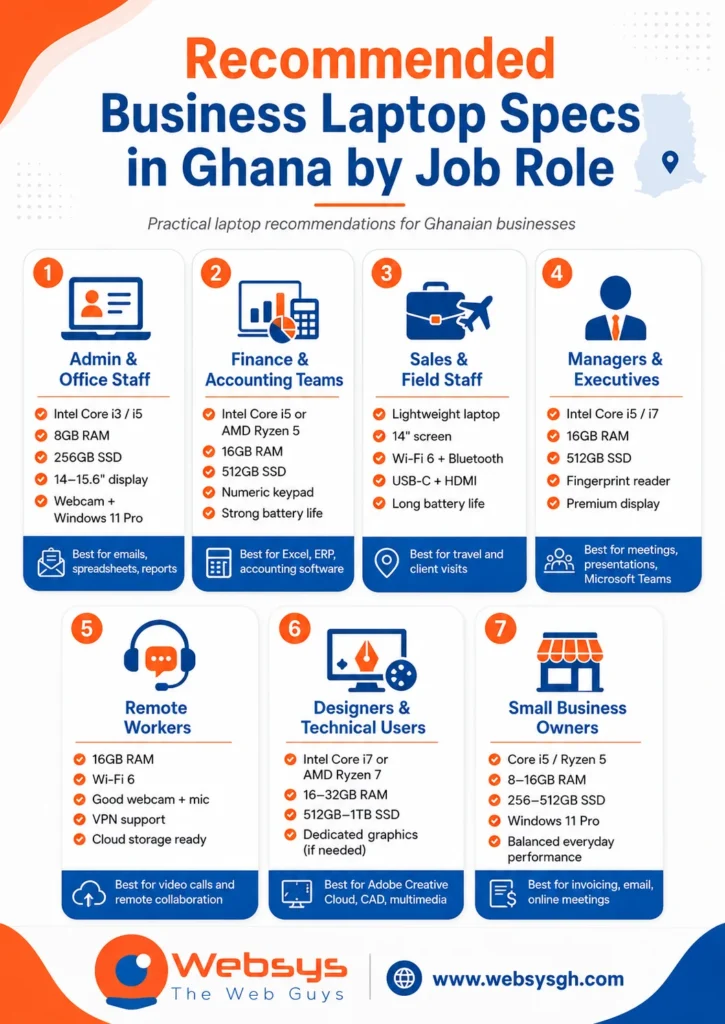
- Admin and office staff
Choose Intel Core i3 or Core i5, 8GB RAM, and 256GB SSD. A 14-inch or 15.6-inch screen, webcam, and Windows 11 Pro can handle daily office tasks.
This setup works well for emails, reports, spreadsheets, online meetings, and document management. It also keeps the budget sensible for larger teams. - Finance and accounting teams
Choose Intel Core i5 or AMD Ryzen 5, 16GB RAM, and 512GB SSD. A numeric keypad helps users who enter figures throughout the day.
Finance teams often run Excel, accounting software, ERP tools, payment records, and reports together. Extra RAM makes that workload much smoother. - Sales and field staff
Choose a lightweight 14-inch laptop with strong battery life. Wi-Fi 6, Bluetooth, USB-C, HDMI, and a good webcam also matter.
Sales users may move between client offices, shops, warehouses, and meetings. Portability becomes more important than having the biggest screen. - Managers and executives
Choose Intel Core i5, Core i7, AMD Ryzen 5, or Ryzen 7. Pair it with 16GB RAM and 512GB SSD.
Managers need smooth video calls, fast presentations, secure access, and strong battery life. A premium screen and fingerprint reader also help. - Remote workers
Choose 16GB RAM, strong battery life, Wi-Fi 6, and a quality webcam. VPN support, endpoint protection, and cloud storage should also be planned.
Remote staff depend on stable communication. A weak microphone, a poor webcam, or a slow processor can disturb meetings and reduce work quality. - Designers and technical users
Choose Intel Core i7, Intel Core Ultra, AMD Ryzen 7, or higher. Use 16GB to 32GB RAM and 512GB to 1TB SSD.
Designers may need Adobe Creative Cloud, video editing software, CAD tools, or large design files. Some users may also need dedicated graphics.
Digital payments also make reliable laptops more useful for business records. Bank of Ghana data shows 23,486,648 active mobile money accounts in 2024, which means many companies now manage more digital payment records, reconciliations, and reports.
Minimum Laptop Specifications for Business Use in 2026
Minimum specs should protect your business from slow performance and early replacement costs. A cheap laptop can become expensive when staff lose time every day.
Processor
For most office users, Intel Core i5 or AMD Ryzen 5 is a safe minimum. Core i3 can work for very basic tasks, but it may age quickly.
Choose Core i7, Core Ultra, or Ryzen 7 for heavier users. Designers, analysts, developers, and technical staff need more processing power.
RAM
8GB RAM can handle basic email, documents, and light browsing. However, 16GB RAM is now the better choice for most business users.
Teams using Microsoft Teams, browser tabs, Excel, OneDrive, and cloud apps need smooth multitasking. More RAM also gives the laptop a longer useful life.
Storage
Always choose SSD storage instead of HDD storage. SSDs make laptops boot faster, open files quicker, and feel smoother during daily work.
A 256GB SSD is the minimum for basic office users. A 512GB SSD is better for finance teams, managers, and staff handling many files.
Operating system
Windows 11 Pro is often better for company-managed laptops. It supports stronger business controls, security features, and easier device management.
Windows 11 Home may work for small users with simple needs. macOS can suit creative teams, executives, and users already working inside Apple’s ecosystem.
Battery life
Battery life matters more than many buyers expect. Sales staff, field teams, remote workers, and managers often work away from fixed desks.
Aim for a laptop that can last through meetings and travel. In Ghana, strong battery performance also helps during power interruptions or long client visits.
Ports and connectivity
Good ports save time in real office situations. Look for USB-C, HDMI, USB-A, Bluetooth, Wi-Fi 6, and docking station support.
Some offices still use projectors, printers, scanners, and wired networks. An Ethernet adapter can help when a stable wired internet is needed.
Security features
Security should not be an afterthought. Look for TPM, fingerprint login, BIOS protection, webcam privacy shutter, antivirus, endpoint protection, and backup tools.
Also, avoid pirated software. Fake Windows, cracked Office, or unlicensed antivirus software can expose your company to data loss and compliance issues.
Business Laptop Budget Checklist for Ghanaian Companies
A practical business laptop guide for Ghana companies must look beyond device price. The real cost includes software, warranty, delivery, support, accessories, and replacement planning.
- Set the budget by job role
Do not buy the same laptop for everyone. Admin staff, finance teams, managers, designers, and field staff need different performance levels.
This approach avoids overspending on light users. It also prevents underbuying for teams that need stronger machines. - Compare the total cost of ownership
A cheaper laptop may cost more over three years. Repairs, downtime, slow performance, and early replacement can eat your savings.
Look at the full working life of the device. Warranty support, software, accessories, and maintenance all affect the final cost. - Budget for genuine software licensing
Include Microsoft 365, Microsoft Office, antivirus, endpoint protection, VPN, backup software, and cloud storage where needed.
Accounting teams may also need ERP or accounting software. Designers may need Adobe Creative Cloud or other paid creative tools. - Include delivery and installation costs
If your company operates outside Accra, include nationwide delivery costs. Set-up support may also affect the total budget.
Device configuration, software installation, user accounts, and asset tagging should be included early. This prevents confusion after delivery. - Plan for accessories
Laptops often need bags, mice, keyboards, docking stations, monitors, HDMI adapters, Ethernet adapters, and spare chargers.
These items look small, but they affect daily comfort. A good workstation helps staff work faster and with fewer complaints. - Request a clear business laptop quote
A proper quote should show exact model numbers, specifications, warranty terms, quantity, delivery time, and payment terms.
Avoid vague quotes. Two laptops may look similar online, but different processors, screens, RAM, and warranties can change everything.
Best Business Laptop Brands to Consider in Ghana
The best brand depends on budget, workload, warranty, and local availability. No single laptop brand is perfect for every Ghanaian business.
HP business laptops
HP ProBook and EliteBook models are strong choices for many Ghanaian offices. They suit admin staff, managers, SMEs, and corporate teams.
These models usually offer practical business features and solid daily performance. They are also familiar to many IT support teams.
Dell business laptops
Dell Latitude models suit corporate offices, finance teams, and professionals needing reliable performance. The Dell Precision models are better suited to heavier technical tasks.
These laptops are often considered for structured business environments. They can support finance, management, reporting, and productivity work well.
Lenovo business laptops
Lenovo ThinkPad and ThinkBook models work well for office staff and remote workers. Many users like their keyboards, sturdy build, and business-friendly design.
They suit managers, writers, developers, and staff who type for long hours. ThinkPad models are especially known for practical durability.
Apple MacBook for business users
MacBooks can work well for executives, designers, marketers, and creative teams. They offer strong battery life, premium build quality, and smooth performance.
However, software compatibility should come first. If your company depends on Windows-only accounting or ERP software, check that before buying.
Acer and Asus business options
Acer and Asus can suit budget-conscious SMEs and light office users. They can be useful when the workload is simple and the budget is tight.
Still, check the exact model carefully. Warranty, battery quality, build strength, and supplier credibility matter more at lower price points.
New vs Refurbished Business Laptops in Ghana: Which Is Better?
New and refurbished laptops can both work, but they carry different risks. Your choice should depend on budget, warranty, device condition, and support needs.
- Choose brand-new laptops for growing teams
New laptops usually offer cleaner warranty terms and longer device life. They also make standardisation easier across departments.
This is better for companies buying laptops for office staff, finance teams, executives, or remote teams. - Choose refurbished laptops only from trusted suppliers
Refurbished laptops can reduce costs, but the condition must be checked. Battery health, SSD life, keyboard quality, screen condition, and charger originality matter.
A short warranty is a warning sign. Ask for clear support terms before paying. - Avoid suspiciously cheap laptops
Very low prices can hide serious problems. Some devices may have weak batteries, changed parts, fake specs, or damaged screens.
Cheap laptops can also come with pirated software. That creates security and compliance risks for your business.
How to Avoid Fake or Poor-Quality Laptops in Ghana
- Check the serial number
Match the serial number on the laptop, box, BIOS, and invoice. Then verify it through the manufacturer’s support website where possible.
This helps confirm the model, warranty status, and product identity. It also protects your company from misleading listings. - Inspect the charger and battery
A poor charger can damage the laptop and create safety risks. Battery condition also affects remote workers and field staff.
For refurbished laptops, ask about battery health. A weak battery can make a cheap laptop feel useless. - Confirm the exact model number
Similar-looking laptops can have very different specifications. One model may have a Core i5 and SSD, while another has weaker parts.
Ask the supplier to show the full model number. Then compare it with the quote before approval. - Request proper invoices and warranty documents
Businesses need clean records for accounting, audits, and warranty claims. A verbal promise is not enough.
Your invoice should list quantity, model, price, warranty terms, and supplier details. Keep copies for future support. - Avoid pirated software bundles
Pirated software may look free, but it can cost more later. It may expose your company to malware, data loss, and compliance problems.
Use genuine Windows, Microsoft 365, antivirus, backup tools, and endpoint protection. Your business data deserves proper protection.
Laptop Procurement Checklist for Ghanaian Companies
Laptop procurement works best when it follows a clear checklist. A structured process helps you compare suppliers fairly and avoid rushed buying decisions.
| Procurement Step | What to Check |
| User roles | Admin, finance, sales, remote, executive, design |
| Specifications | Processor, RAM, SSD, battery, screen, ports |
| Software | Windows 11 Pro, Microsoft 365, antivirus, VPN |
| Warranty | Manufacturer warranty, supplier warranty, claim process |
| Supplier | Invoices, references, genuine products, support terms |
| Delivery | Accra, Kumasi, Tema, Takoradi, Tamale, nationwide delivery |
| Setup | Asset tagging, user configuration, and software installation |
| Support | After-sales support, repairs, and replacement planning |
A useful Ghana-based example comes from the Ghana Economic Transformation Project. World Bank procurement records show an IT-related package for GIPC and NBSSI covering 32 desktop PCs, 21 laptops, 10 all-in-one PCs, multifunction printers, and scanners. The same procurement plan also listed networking accessories and Microsoft Office, plus antivirus software for 50 users.
This example shows why procurement should not focus on laptops alone. A proper plan should include software licensing, networking, security, warranty, delivery, and after-sales support.
Where to Buy Business Laptops in Ghana
Finding the right supplier matters as much as choosing the right laptop. The supplier should offer genuine products, clear quotes, warranty documents, delivery support, and after-sales service.
- Choose trusted laptop suppliers in major Ghanaian cities
Businesses in Accra, Kumasi, Tema, Takoradi, Cape Coast, and Tamale should compare suppliers carefully.
Do not choose based only on the lowest price. Check warranty support, product authenticity, delivery timeline, and invoice quality. - Use bulk laptop procurement for team purchases
If you need several laptops, bulk procurement usually gives better control. It helps you standardise models, software, accessories, and support.
It also makes budgeting easier. Procurement officers can compare full quotes instead of checking random retail prices. - Work with a supplier that understands business needs
A proper supplier should ask about staff roles, software, quantity, budget, delivery location, and support expectations.
WebSys Technology states that it provides IT hardware and software procurement in Ghana, including laptops, desktops, networking equipment, software licensing, delivery, asset tagging, and installation support.
Conclusion
Choosing the right laptop should feel practical, not confusing. This Business Laptop Buying Guide shows that a smart buying decision starts with your team’s real work. Office staff, finance teams, remote workers, and managers all need different levels of speed, storage, battery life, and security. Before you buy, check the processor, RAM, SSD, operating system, ports, warranty, and supplier support.
Also look beyond the sticker price because cheap laptops can create expensive problems later. For Ghanaian companies, the safer route is to compare proper quotations, confirm genuine products, and plan software licensing from the start.
Need help buying business laptops in Ghana? WebSys Technology can support your procurement with genuine devices, warranty-backed supply, delivery, setup, and after-sales service.
GET IN TOUCH
Book Free IT Procurement Consultation
FAQs
Yes, Intel Core i5 is enough for most office tasks, including emails, Microsoft Office, browsing, Teams calls, and basic accounting. Heavy design, analytics, or development work may need a Core i7.
8GB RAM can handle basic office work, emails, browsing, and documents. For multitasking, Teams calls, cloud apps, and large spreadsheets, 16GB RAM is the better choice.
New laptops offer a cleaner warranty, better standardisation, and longer replacement cycles. Refurbished laptops can work for tight budgets, but only when battery, SSD, warranty, and supplier credibility are verified.
HP, Dell, and Lenovo are strong business choices for many Ghanaian companies. Apple, Acer, and Asus can also work depending on workload, budget, software needs, and support availability.
Check manufacturer warranty, local supplier warranty, warranty duration, claim process, battery coverage, charger coverage, serial number validity, and local repair support before approving any laptop purchase.
Check the serial number, verify the model, inspect the charger, request a proper invoice, and confirm warranty status. Avoid suspiciously cheap laptops with unclear documents or fake software.
Yes, business laptops should include genuine Microsoft 365 or Office, antivirus, endpoint protection, cloud backup, and regular updates. Licensed software reduces downtime, data risks, and compliance problems.