
Why is server procurement in Ghana now such a big decision for growing businesses? Many Ghanaian companies now rely on accounting software, customer records, shared files, mobile payments, branch teams, and online systems. When basic PCs can’t cope, the right business server helps protect data, speed up work, and reduce costly downtime.
Quick Answer
Good server procurement in Ghana means choosing, sourcing, installing, configuring, securing, and supporting the right server for your business needs. A growing company may need a server when files become scattered, applications slow down, backups feel risky, or staff need better access control. The right option could be an on-premise server, cloud server, dedicated hosting, colocation, NAS, backup server, or virtualisation server. Your final choice should depend on users, storage, software, budget, security, power, backup, and future growth. Done properly, server setup reduces downtime, hidden costs, wrong specifications, and weak data protection.
- Quick Answer
- What Is Server Procurement?
- Signs Your Growing Business in Ghana Needs a Server
- Your team is sharing files across many computers
- Your accounting, ERP or CRM system is becoming slow
- You need better control over user access and permissions
- Your business data needs stronger backup and recovery
- You have multiple branches or remote workers
- You are outgrowing basic PCs, external drives or consumer NAS devices
- Server Procurement Options in Ghana: On-Premise, Cloud, Dedicated Hosting or Colocation
- Types of Servers Growing Businesses Should Consider
- Server Specifications Checklist for Ghanaian Businesses
- Recommended Server Configurations by Business Size and Use Case
- Server Security Requirements Before Procurement
- What Should Be Included in a Server Procurement Quote?
- Conclusion
- FAQs
What Is Server Procurement?
Server procurement is the full process of planning, buying, deploying, and supporting a server environment. It is not just ordering a machine from a server supplier. A proper plan looks at workloads, users, applications, security, backups, power, warranties, and long-term support.
- Needs assessment
Start by checking your users, files, software, databases, branches, and growth plans. A clinic, school, retail firm, or accounting office will not need the same server design. - Server specification and sizing
Match the server hardware to your workload. Review the CPU, ECC memory, SSDs, HDDs, RAID controller, power supply, network card, and future storage expansion. - Supplier and warranty evaluation
Don’t choose only the cheapest quote. Check authorised supply, warranty support, serial number tracking, genuine parts, delivery terms, and after-sales service. - Installation and lifecycle support
A strong plan includes server installation, configuration, backup setup, monitoring, patching, documentation, and maintenance. NITA’s data centre description also shows that serious infrastructure needs servers, storage, backup systems, and reliable power resources together.
Signs Your Growing Business in Ghana Needs a Server
Growth rarely announces itself loudly. It often shows through slow apps, missing files, weak backups, repeated staff complaints, and small IT problems that keep returning.
Your team is sharing files across many computers
Scattered files quickly create confusion. One staff member saves a finance sheet locally, while another edits an old copy. Soon, nobody knows the correct version. A file server or NAS gives your team central storage, user permissions, and cleaner collaboration.
Your accounting, ERP or CRM system is becoming slow
Slow accounting, ERP, or CRM software can quietly drain productivity. The issue may be weak storage, poor RAM, or an overloaded PC acting like a server. A proper database server gives business applications stronger performance, better reliability, and cleaner multi-user access.
You need better control over user access and permissions
As your team grows, open access becomes risky. Staff should only see folders, apps, and records linked to their roles. A domain controller, Active Directory, and proper user access control help protect financial data, HR files, and client records.
Your business data needs stronger backup and recovery
Manual backups to external drives are better than nothing. Still, they are easy to forget, damage, or lose. A proper server backup plan uses local backup, cloud backup, off-site backup, encryption, and recovery testing to reduce panic after failure.
You have multiple branches or remote workers
Branches in Accra, Kumasi, Tema, Takoradi, or Tamale need secure access to shared systems. Sending files through personal email or WhatsApp creates risk. A branch server, VPN, cloud server, or hybrid server can support safer remote work.
You are outgrowing basic PCs, external drives or consumer NAS devices
Consumer devices can work at the start. They struggle when users, files, and software demands increase. Ghana’s Ministry of Finance notes that SMEs contribute 70% to GDP and form 92% of businesses, so reliable infrastructure matters deeply for the local economy.
Server Procurement Options in Ghana: On-Premise, Cloud, Dedicated Hosting or Colocation
Choosing the right hosting model shapes your cost, control, speed, support, and risk. For server procurement in Ghana, the best option depends on internet quality, office setup, data sensitivity, staff location, and long-term budget.
| Option | Best For | Main Strength | Watch Out For |
| On-premise server | Offices needing local control | Fast office access and full ownership | Needs UPS, cooling, security, and maintenance |
| Cloud server | Remote teams and scalable apps | Flexible growth and easier remote access | Monthly costs and internet dependency |
| Dedicated hosting | Websites, portals, and databases | More control than shared hosting | Needs technical management |
| Colocation server | Firms owning hardware | Better power, cooling, and connectivity | Needs hardware support and monitoring |
On-premise servers suit businesses that need local file access, internal applications, and direct control. Cloud works well for remote teams or software that must scale quickly. Dedicated hosting suits public-facing systems, while colocation fits firms that own hardware but need stronger data centre conditions.
Ghana’s digital use keeps rising. NCA reported 923,347 TB of mobile data traffic in Q2 2025, which shows a heavier reliance on digital platforms and connected work. Ghana’s data centre market also has around 8–10 live commercial facilities, based on Xalam Analytics estimates.
Types of Servers Growing Businesses Should Consider
Different servers solve different problems. Your choice should follow your workload, office size, storage needs, security needs, support model, and expected growth.
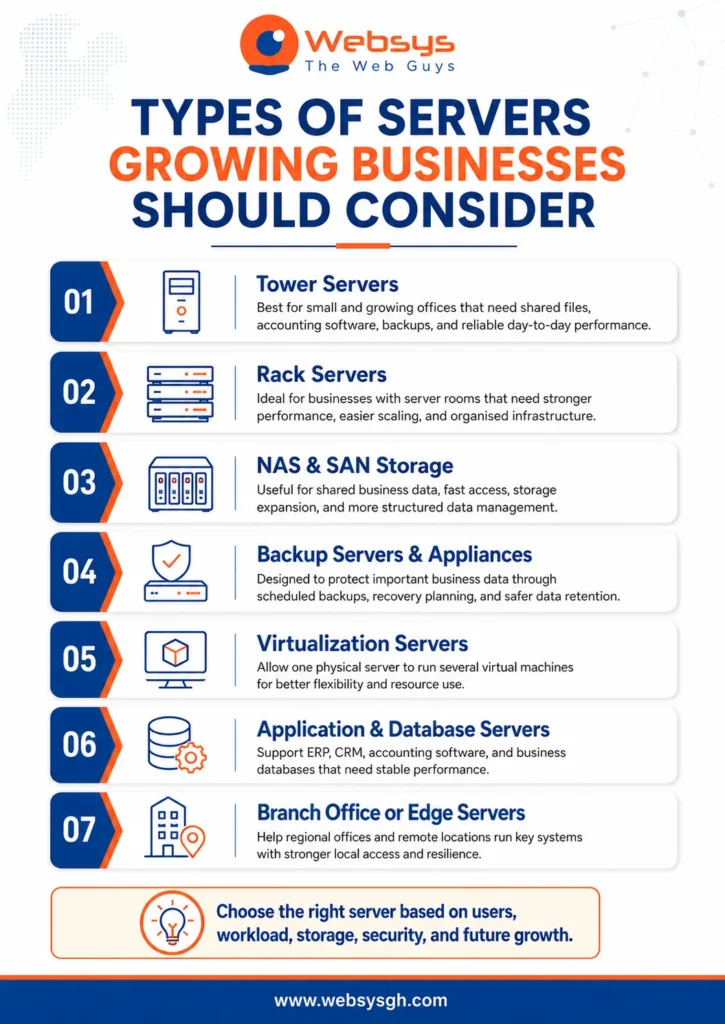
Tower servers for small and growing offices
Tower servers suit small offices that need reliable local computing without a rack cabinet. They work well for accounting firms, clinics, schools, NGOs, and retail companies. A tower server can manage shared files, accounting software, user access, backups, and basic business applications.
Rack servers for businesses with server rooms or data centres
Rack servers suit larger offices with a server room, rack cabinet, UPS, cooling, and structured cabling. They save space and scale better than tower units. Brands such as Dell, HPE, Lenovo, Cisco, and IBM are common choices for rack server environments.
NAS and SAN storage for business data
NAS gives teams shared file storage over the network. SAN supports heavier storage needs, virtual machines, and database workloads. Synology and QNAP are common NAS brands, while larger firms may need SAN storage, RAID, faster disks, and careful data storage solutions planning.
Backup servers and backup appliances
Backup servers protect your business when files disappear, disks fail, or ransomware hits. A backup appliance can manage scheduled copies, retention, encryption, and recovery testing. Good backup planning includes local backup, cloud backup, offsite backup, and clear recovery objectives.
Virtualization servers
Virtualisation lets one physical server run several virtual machines. This can separate accounting, file sharing, testing, database, and application workloads. VMware, Hyper-V, Windows Server, Linux server, and Ubuntu Server can support flexible virtualisation server environments.
Application and database servers
Application and database servers support ERP, CRM, accounting software, inventory systems, school portals, and hospital systems. They need stronger processors, enough RAM, fast SSD or NVMe storage, and reliable backup. Poor sizing can make every department feel slower.
Branch office or edge servers
Branch servers help regional offices work smoothly when the internet service becomes unstable. They can support local files, cached data, POS systems, or warehouse applications. Logistics firms, retailers, clinics, and branch offices often benefit from local resilience.
Server Specifications Checklist for Ghanaian Businesses
A strong specification sheet keeps your buying decision clear. It helps you compare quotes fairly, avoid weak hardware, and reduce surprise costs. For server procurement in Ghana, your checklist should include performance, storage, security, power, licensing, support, and documentation.
- Processor / CPU
Choose Intel Xeon or AMD EPYC for serious business workloads. Match cores and speed to your applications, users, and database activity. - Memory
Use ECC memory for better reliability. A small office may start with 32GB RAM, while larger workloads may need 64GB or 128GB RAM. - Storage
Use SSD or NVMe for speed. Use HDDs for larger, lower-cost storage. Hot-swap drives make replacement easier. - RAID
RAID 1, RAID 5, RAID 6, and RAID 10 improve redundancy. Still, RAID does not replace backup. - Networking
Check 1GbE or 10GbE ports, managed switch support, VLAN needs, and VPN access. - Power and environment
Plan UPS, surge protection, generator or inverter support, cooling, ventilation, dust protection, and physical security. - Software and licensing
Confirm Windows Server, Linux, CALs, Microsoft SQL Server, antivirus, backup software, and compliance needs. - Documentation
Request serial numbers, warranty certificates, VAT invoices, delivery notes, asset register, and installation report.
Recommended Server Configurations by Business Size and Use Case
No business should buy server hardware blindly. A small law office does not need the same setup as a multi-branch retail company. Use this table as a practical starting point before requesting a detailed server quote.
| Business Size or Use Case | Suggested Server Type | Example Specification | Best Use |
| 5–15 users | Entry tower server or NAS | Xeon entry CPU, 32GB ECC RAM, RAID 1 | Files, accounting, simple backup |
| 15–40 users | Tower or small rack server | 64GB ECC RAM, RAID 5 or RAID 10 | ERP, CRM, permissions, shared storage |
| 40–100 users | Rack server with NAS or SAN | 128GB RAM, SSD/NVMe, 10GbE | Apps, databases, virtual machines |
| Multi-branch business | Hybrid server setup | Branch server, VPN, cloud backup | Remote access and local resilience |
| Data-heavy business | Rack server plus storage | RAID 10, NVMe, backup appliance | Databases, reporting, analytics |
Avoid overspending when a tower server can solve the issue. Also avoid undersizing an ERP or database server. The cheapest server can become expensive when it causes downtime, weak backup, storage shortage, or an unsupported warranty.
Always include UPS, backup, installation, licensing, warranty, and server support in the real budget. That gives you a truer total cost of ownership.
Server Security Requirements Before Procurement
Server security should start before buying anything. Hardware choices, network design, software licensing, backup tools, and access rules all affect your risk level.
User access control
Every user should have their own account. Permissions should follow job roles, not convenience. Active Directory, domain controller setup, password rules, and access reviews help protect finance folders, HR records, client files, and sensitive operational data.
Firewall and network segmentation
A server should not sit inside a flat, open network. Use a firewall, managed switch, VLANs, and VPN rules. Separate guest Wi-Fi, CCTV, finance systems, staff devices, and server traffic where possible.
Endpoint protection and server antivirus
Servers need endpoint protection, not just office laptops. Antivirus software, ransomware protection, and server monitoring reduce common threats. Solutions from Microsoft, Sophos, Fortinet, and similar vendors can support safer network security.
Patch management and firmware updates
Outdated software creates easy entry points for attackers. Plan Windows Server updates, Linux patches, firmware updates, router updates, and firewall updates. Schedule patching carefully, so updates do not break critical business operations.
Backup encryption
Backups often contain customer records, staff files, payroll data, supplier details, and financial reports. Encrypt local, cloud, and off-site backups. Test restores regularly, because an untested backup is only a hopeful promise.
Physical access control
Servers also need physical protection. Use a lockable rack cabinet, secure server room, access control, CCTV, cooling, and dust protection. Ghana’s heat, dust, and power conditions make proper room planning very important.
Monitoring and alerting
Monitoring helps your team spot trouble early. It can flag low disk space, failed backups, overheating, high CPU use, disk errors, and downtime. Alerts help IT managers or support partners react before staff complain.
Admin account protection
Admin accounts need stronger protection than normal user accounts. Use strong passwords, multi-factor authentication where possible, separate admin accounts, and audit logs. One weak admin account can expose the whole server environment.
Ghana’s Cyber Security Authority reported that it investigated 155 cyber-related cases and helped recover GHS 49.6 million in financial losses in 2024. That makes security-first procurement a business issue, not just an IT concern.
What Should Be Included in a Server Procurement Quote?
A good quote should explain exactly what your business will receive. It should separate hardware, software, installation, support, and optional items. In server procurement in Ghana, vague quotations often hide weak specifications, missing licences, and poor after-sales support.
| Quote Item | Why It Matters | What To Check |
| Server hardware | Confirms the actual machine | Brand, model, CPU, RAM, storage, PSU |
| Storage and RAID | Affects speed and resilience | SSD, HDD, NVMe, RAID level, expansion |
| Software licensing | Avoids compliance problems | Windows Server, CALs, SQL, backup tools |
| Backup solution | Protects business data | Local, cloud, offsite, schedule, encryption |
| Power protection | Reduces failure risk | UPS, surge protection, runtime, battery support |
| Network equipment | Supports secure access | Firewall, switch, VLAN, VPN, 10GbE needs |
| Installation service | Makes the server usable | Setup, configuration, permissions, testing |
| Documentation | Supports accountability | VAT invoice, warranty, delivery note, serials |
| Support terms | Protects long-term use | SLA, response time, maintenance, warranty claims |
Also ask whether the quote includes asset tagging, an installation report, admin handover, backup testing, and maintenance terms. Ghana’s Data Protection Commission states that organisations collecting or processing personal data must register with the Commission, which makes proper data handling important for many businesses.
WebSys Technology supports IT procurement across servers and storage, networking, software licensing, delivery, installation, asset tagging, warranty management, and after-sales support in Ghana. Its service page also lists rack and tower servers, NAS/SAN storage, backup appliances, and virtualisation hardware.
Conclusion
Proper server procurement in Ghana starts with understanding your business needs clearly. Your team may need a server when files become scattered, software slows down, backups feel weak, or branches need secure access.
The right choice depends on users, applications, storage, security, power, licensing, budget, and future growth. Don’t buy a server only because the price looks low. Wrong specifications can lead to downtime, data loss, hidden costs, and an unsupported warranty. A clear quote should include hardware, software, backup, installation, documentation, and support.
Need help planning business servers for your Ghanaian company? WebSys Technology can support you with genuine server hardware, storage, backup solutions, networking equipment, software licensing, delivery, installation, warranty management, and after-sales support across Ghana.
FAQs
A growing business needs a server when shared files, slow apps, weak backups, many users, remote branches, and access control problems start affecting daily work, security, and productivity.
Choose a tower server for a small office with limited space. Choose a rack server when you have a server room, rack cabinet, UPS, cooling, and future expansion needs.
A small business can start with Intel Xeon or AMD EPYC, 32GB to 64GB ECC RAM, SSD storage, RAID, backup storage, UPS protection, and proper warranty support.
No, RAID is not a backup. RAID helps keep drives resilient, while backup protects separate data copies from deletion, ransomware, corruption, theft, fire, or full server failure.
Choose on-premise for local control and fast office access. Choose cloud hosting for remote teams and flexible scaling. Many Ghanaian businesses use a hybrid setup.
A server quote should include hardware specs, software licensing, storage, backup, UPS, installation, configuration, delivery, documentation, warranty, maintenance, after-sales support, and any optional upgrade costs.
Server cost depends on brand, processor, RAM, storage, licensing, backup, installation, support, and business size. Request a proper needs assessment before accepting any server quote.