
Software licensing in Ghana has become a real business issue, not a small IT detail. As more companies rely on Microsoft 365, antivirus tools, Adobe apps, and business software, the risks of fake, cracked, or expired licenses grow fast. Ghana also recorded 2,008 cyber incidents in the first half of 2025, a 52% rise from 2024, while losses exceeded GH¢19.3 million in the first nine months of 2025. That means you need software that stays secure, supported, and genuine. You’ll understand which licenses matter, how to choose them well, and where WebSys can help.
Key Takeaways
- Genuine software licensing helps protect your business from malware, downtime, and surprise interruptions.
- Microsoft 365, antivirus, Adobe, ERP, and industry tools solve different operational needs across teams.
- Cheap “lifetime” keys often fail later because many are unauthorised or reused.
- The right software licensing choice depends on users, devices, workflows, budget, and growth plans.
- Proper licensing gives you updates, clarity on renewals, proof of invoices, and better support.
- Ghana’s rising cybercrime figures make secure and authentic software a smarter business decision.
- Buying through a trusted IT procurement partner in Ghana reduces risk and saves internal time.
- Key Takeaways
- Why Genuine Software Licensing Matters for Ghanaian Businesses
- Common Software Licenses Ghanaian Businesses Need
- Genuine Software vs Fake Software: How to Know the Difference
- How to Choose the Right Software License for Your Business
- Common Software Licensing Mistakes Businesses in Ghana Should Avoid
- Where to Buy Licensed Software in Ghana
- Questions to Ask Before Buying Any Software License
- Conclusion
- Book Free IT Procurement Consultation
- FAQs
Why Genuine Software Licensing Matters for Ghanaian Businesses
Running a business on questionable software is like locking your front door with a weak padlock. It may look fine for a while. Then one failed update, blocked activation, or malware issue can stop work across your team. Genuine licensing matters because it keeps software reliable, easier to manage, and safer for daily use. It also gives your business a cleaner operating environment as digital work expands in Ghana. The Cyber Security Authority’s data show that cyber incidents and losses are rising, so software quality now directly affects business resilience.
It Protects Your Business From Fake or Expired Software
Fake software often works just long enough to create false confidence. Then it starts failing when you need it most. Some versions can’t update. Others lose activation after a short period. A few may include hidden code that damages files or opens security gaps.
For a Ghanaian business, that risk can hit operations in simple but painful ways:
- Staff may lose access to email, spreadsheets, or documents during working hours.
- Teams may waste time fixing activation errors instead of serving customers.
- Expired or fake software may break after system updates or hardware changes.
- Business data may become harder to recover if unsupported tools fail suddenly.
This problem also affects buying decisions. Suspiciously cheap keys may seem attractive at first. However, they can become expensive once renewals, reinstallations, lost productivity, and support gaps pile up. A genuine license gives you more than activation. It gives you a stable foundation for daily work.
It Improves Cybersecurity
Cybersecurity starts with many small decisions. Software licensing is one of them. Genuine software receives vendor patches, security fixes, and trusted updates. Cracked or tampered software often misses those protections. That leaves businesses more exposed to malware, phishing-related compromise, and system abuse.
This matters even more in Ghana’s current digital environment. Ghana lost over GH¢19.3 million to cybercrime between January and September 2025, and online fraud accounted for 36 per cent of reported incidents during that period. BSA also says that unlicensed software can cost businesses more than $10,000 per computer due to malware and related impacts.
Good licensing improves security in practical ways:
- It keeps operating systems and apps patched against known vulnerabilities.
- It helps antivirus and endpoint tools stay current with new threat definitions.
- It reduces the chance of installing tampered files from unsafe sellers.
- It supports cleaner identity management across staff accounts and devices.
In short, licensed software won’t solve every security issue. Still, it removes one major source of avoidable risk.
It Gives Access to Support and Proper Renewal
Businesses rarely need software alone. They need setup help, migration support, renewal reminders, troubleshooting, and account management. Genuine licensing makes those things possible. When you buy through proper channels, support becomes part of the value.
That support matters during real business moments:
- A new employee joins and needs access fast.
- Your company moves email to Microsoft 365.
- Adobe seats need to be reassigned after role changes.
- Antivirus deployment must cover more laptops.
- Renewal dates approach and budgets need planning.
Without proper licensing, those routine tasks become messy. Support teams may refuse help. Activation records may be missing. Renewal dates may remain unclear. Ghana’s broader cybersecurity licensing environment also shows that digital compliance is becoming more formal and structured. So, businesses benefit when software procurement includes support and clear ownership of renewals.
It Helps With Compliance and Business Trust
Software licensing in Ghana also affects how others see your business. Clients, partners, auditors, and internal stakeholders expect professional systems. When a business uses licensed software, it shows discipline, accountability, and attention to risk. Those qualities support trust.
This matters for growing firms especially:
- Proper licenses create cleaner records for finance and audit teams.
- Vendor-backed tools strengthen credibility during client onboarding.
- Managed accounts help protect company data when staff leave.
- Consistent renewals reduce the risk of embarrassing service interruptions.
The value goes beyond legal comfort. It also shapes reputation. In many sectors, trust grows through small signals. Genuine software is one such signal because it shows the business takes its operations seriously.
Common Software Licenses Ghanaian Businesses Need
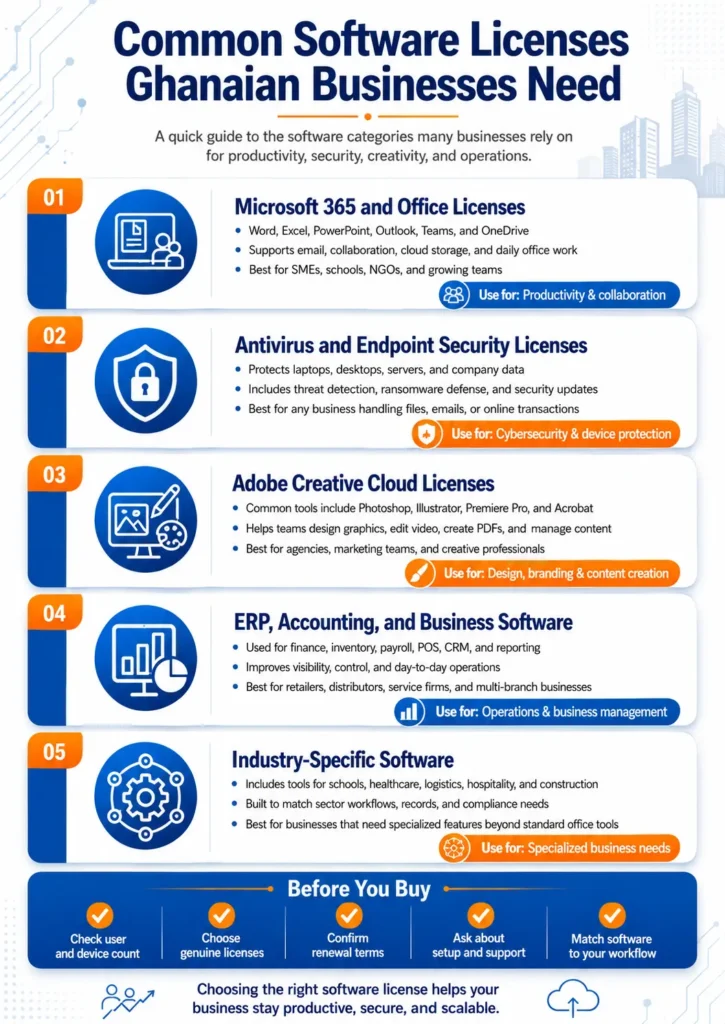
Most Ghanaian businesses don’t need every software product on the market. They need the right mix. The best license setup supports how your team works today while leaving room to grow tomorrow. Some companies mainly need communication and productivity tools. Others need strong endpoint security, design software, or operations platforms. The smartest approach is to match software with job roles, data sensitivity, and workflow needs.
A good procurement strategy usually covers these practical areas:
- Core productivity tools for email, documents, meetings, and storage.
- Security tools for laptops, desktops, servers, and remote staff.
- Creative tools for branding, presentations, and marketing output.
- Finance and operational tools for accounting, stock, payroll, and reporting.
- Industry software built for your sector’s daily processes.
Microsoft 365 and Office Licenses
Microsoft 365 remains one of the most important software investments for modern businesses. It combines familiar Office apps with cloud tools that support communication, collaboration, storage, and team coordination. For many firms in Ghana, it sits at the centre of daily work.
Businesses use Microsoft 365 for several reasons:
- Outlook helps teams manage professional email and calendars in one place.
- Word, Excel, and PowerPoint support documents, reporting, analysis, and presentations.
- Teams improves meetings, messaging, and internal collaboration across locations.
- OneDrive and SharePoint help store, share, and control company files.
- Admin controls make it easier to manage users, passwords, and access rules.
A proper business license matters because personal plans don’t offer the same level of administrative control. Company-owned licenses also protect continuity. If an employee leaves, the business still controls access to data, email, and files. That reduces chaos and keeps operations moving.
Antivirus and Endpoint Security Licenses
Antivirus software is no longer just a basic desktop tool. Businesses now need broader endpoint security that protects laptops, office systems, remote devices, and sometimes servers. Attackers don’t care if a company is small. In fact, smaller firms often have weaker controls, which makes them easier targets.
Licensed endpoint security usually gives you:
- Real-time malware detection and removal.
- Frequent updates for new threats and attack patterns.
- Web protection against malicious links and downloads.
- Centralised dashboards for managing multiple devices.
- Better visibility when a device becomes compromised.
This matters because cybercrime pressure is rising in Ghana. A proper security license helps businesses move from reactive cleanup to active protection. That shift saves time, reduces panic, and protects business continuity.
Adobe Creative Cloud Licenses
Adobe Creative Cloud matters for businesses that produce marketing, design, branding, training, or visual communication work. Teams often rely on Photoshop, Illustrator, InDesign, Premiere Pro, Acrobat Pro, and related apps. When those tools are poorly licensed, creative work slows down quickly.
Business-focused Adobe licensing offers important advantages:
- Team access can be assigned or moved when staff roles change.
- Billing stays under company control rather than on personal cards.
- Creative files remain connected to the business, not one employee.
- Admin oversight simplifies renewals and seat management.
- Standardised tools improve collaboration across design and marketing teams.
For example, a Ghanaian business running social campaigns, brochures, proposals, and branded documents needs consistency. Personal accounts can create confusion. Team licenses create order.
ERP, Accounting, and Business Software
Business software handles the work that keeps money, stock, records, and operations moving. That includes accounting packages, ERP systems, payroll tools, invoicing apps, and procurement platforms. When these systems break, the business feels it fast.
Licensed business software helps in several ways:
- It improves data accuracy through supported updates and stable features.
- It allows more secure multi-user access across departments.
- It reduces manual work through automation and better reporting.
- It helps managers clearly track cash flow, inventory, and performance.
- It supports long-term scaling as the business becomes more structured.
This category deserves careful buying decisions. A low-cost shortcut can damage records, create duplicate entries, or block access at critical moments. Reliable licensing supports cleaner operations and better decisions.
Industry-Specific Software
Some businesses need software tailored to their exact sector. General tools won’t always cover those workflows well. Industry-specific software provides teams with features tailored to real operational tasks, reporting requirements, and customer journeys.
Examples include:
- Healthcare systems for patient records, appointments, and billing.
- School management software for admissions, fees, attendance, and reports.
- Retail POS systems for stock, receipts, and cashier management.
- Construction software for estimates, projects, and resource planning.
- Hospitality or restaurant tools for orders, inventory, and reservations.
- Logistics platforms for fleet, dispatch, and delivery coordination.
These licenses often require more than activation. They may need deployment, customisation, data import, user training, and ongoing support. That makes the choice of vendor and procurement partner even more important. The right software should fit the business’s daily rhythm, not just the budget sheet.
Genuine Software vs Fake Software: How to Know the Difference
Many fake products look convincing at first glance. The problem usually appears later. A system refuses updates. A key stops working. Support never replies. That’s why buyers should check proof, pricing, vendor credibility, and renewal terms before payment.
| Factor | Genuine Software | Fake Software |
| Price | Usually close to official market pricing | Unusually cheap or marketed as a “special secret deal” |
| Proof | Comes with invoice, license details, or account ownership | Little proof, vague screenshots, or no invoice |
| Updates | Receives vendor patches and feature updates | Updates fail, break, or remain blocked |
| Support | The seller or vendor can assist with setup and renewal | No real help after payment |
| Security | Lower risk when sourced and deployed correctly | Higher risk of tampering or malware |
| Ownership | Linked to a valid user, tenant, or company account | Often shared, recycled, or illegally reused |
| Renewal | Clear terms and timelines | Confusing promises or no renewal process |
| Reliability | Stable for ongoing business use | May stop working without warning |
Use this section as a quick buyer checklist:
- Ask for an invoice before or at the time of purchase.
- Confirm whether the license is for business use.
- Verify if the seller offers setup and renewal help.
- Be cautious with “lifetime” claims for subscription products.
- Check whether ownership sits with your company account.
If the offer sounds too good to be true, it usually is.
How to Choose the Right Software License for Your Business
The right license depends on how your business actually works, not on hype. Some teams need flexible monthly access. Others need annual cost control. A small office may only need productivity tools and antivirus software. A larger business may need Microsoft 365, endpoint protection, ERP, and specialised applications together. Good selection starts with clarity, not guesswork.
This buying process works best when you review users, devices, tasks, plans, and support needs together. That helps you avoid overbuying, underbuying, or choosing tools that sound impressive but don’t fit.
Count Your Users and Devices
Start with a simple audit. Count how many people need access. Then count how many devices they use for work. This step sounds basic, yet many businesses skip it and create confusion later.
You should check:
- Full-time staff, part-time staff, and temporary users.
- Shared office devices and individual laptops.
- Mobile phones are used for email or business apps.
- Remote workers who need secure access outside the office.
- Future hires are expected within the next year.
This helps you avoid two common problems. The first is buying too few licenses, which hinders productivity. The second is paying for software seats nobody uses.
Match Software With Business Needs
Not every employee needs the same tools. Finance teams use software differently from designers. Sales staff work differently from operations teams. So, software licensing should follow actual job needs.
A practical way to think about it:
- Admin teams may need email, documents, spreadsheets, and cloud storage.
- Designers may need Adobe apps plus file-sharing tools.
- Finance staff may need access to accounting or ERP systems.
- Leadership may need reporting dashboards and secure communication.
- Frontline teams may need lighter, role-based access to software.
This approach keeps spending smarter. It also helps businesses avoid paying premium rates for features many staff never use.
Decide Between Monthly and Annual Licensing
Monthly licensing offers flexibility. Annual licensing often offers better value. The right option depends on staffing stability, project cycles, and budget planning.
Monthly plans may work better when:
- Your team size changes often.
- You run short-term projects or campaigns.
- You want lower upfront commitments.
Annual plans may work better when:
- Your workforce is stable.
- You want easier budgeting across the year.
- You prefer a lower total cost over time.
- You don’t want frequent billing administration.
Compare total cost, not just monthly price. A cheaper-looking monthly plan can cost more over twelve months.
Check Support, Setup, and Migration Help
A valid license still needs proper implementation. That is where many businesses struggle. They buy software, then discover email migration, user creation, admin setup, and device deployment require time and technical skill.
So, ask the seller important questions:
- Will they set up business accounts correctly?
- Can they migrate email or files safely?
- Do they help install antivirus software across devices?
- Can they assign or transfer licenses later?
- Do they provide renewal reminders and support?
This support layer matters because software should solve problems, not create fresh ones.
Ask for the Invoice and License Proof
Never buy software without documentation. Invoice proof and license records protect your business later. They also make renewal, support, and internal tracking much easier.
Keep these records safe:
- Purchase invoice.
- License key or activation record.
- Business account ownership details.
- Renewal dates.
- Number of users or devices covered.
- Vendor or reseller contact information.
Those details become extremely useful when staff change, devices fail, or audits arise. Good records turn software management into a routine task instead of a scramble.
Common Software Licensing Mistakes Businesses in Ghana Should Avoid
Many software problems don’t start with bad luck. They start with avoidable mistakes. Businesses often try to save money quickly, skip documentation, or use whatever seems convenient. Later, those shortcuts create higher costs, security issues, and operational confusion.
This section matters because the same errors appear again and again in growing companies. Once you spot them early, you can avoid trouble before it lands on your desk.
Buying Very Cheap “Lifetime” Keys
A “lifetime” deal can sound amazing on the surface. However, many of these offers are unreliable. Subscription software rarely works that way through legitimate business channels.
Watch for these warning signs:
- The price is far below normal market rates.
- The seller avoids giving a clear invoice.
- Support disappears after payment.
- Activation works briefly, then fails later.
- The license cannot be linked to your company account.
Cheap keys often become dead keys. Then the business pays twice.
Sharing One License Across Many Staff
One license shared across many employees might look like a simple cost-saving move. In reality, it creates access problems, security confusion, and licensing violations. It also makes it hard to know who changed files, downloaded data, or triggered alerts.
Proper multi-user licensing is safer because:
- Each staff member gets controlled access.
- Activity becomes easier to track.
- Password sharing has reduced.
- Offboarding becomes more secure.
- Renewals reflect real usage.
This is one of those shortcuts that often costs more later.
Using Personal Accounts for Company Work
Personal accounts and company work should not mix. It may seem harmless when a team is small. Then someone leaves with company files tied to a private email address. That can create confusion, access loss, or even a dispute.
Business-owned accounts help because:
- The company keeps control of mail and files.
- Access can be reassigned when roles change.
- Security policies stay under management control.
- Records remain cleaner for audit and compliance.
This issue appears often with Microsoft 365 and Adobe accounts. It’s better to fix it early.
Forgetting Renewal Dates
Renewal dates have a habit of arriving at the worst time. A company may notice them during payroll week, a client deadline, or a busy sales period. That is why renewal planning matters.
A simple process can help:
- Track dates in a shared calendar.
- Store all licenses in one internal register.
- Review upcoming renewals monthly.
- Assign ownership to one responsible person.
- Budget ahead for annual software costs.
Renewals shouldn’t surprise a business. They should be routine.
Not Keeping License Records
Poor recordkeeping causes unnecessary stress. Without clear records, businesses struggle to confirm ownership, check expiry dates, add users, or prove what they bought. Even a legitimate purchase can become a problem if nobody can find the details.
Keep one clean record for:
- Vendor name.
- Product and plan.
- License count.
- Start and expiry date.
- Admin login ownership.
- Purchase invoice and proof.
That small habit saves serious time later.
Where to Buy Licensed Software in Ghana
Buying licensed software is not only about finding a seller. It is about finding a reliable partner. The right provider understands product fit, business use, setup requirements, renewal cycles, and post-sale support. That makes a big difference, especially when your business depends on software every day.
When choosing where to buy, look for providers that offer:
- Genuine software sourced through trusted channels.
- Clear invoices and license proof.
- Set up assistance for Microsoft 365, antivirus, Adobe, and business tools.
- Renewal tracking and ongoing support.
- Advice based on your team size and workflow needs.
- Help with scaling licenses as the business grows.
This is where an IT procurement company adds real value. Instead of guessing your way through software choices, you get guidance, supply confidence, and support in one place. WebSys fits that role well because its IT procurement focus centres on helping businesses source and deploy genuine technology solutions for operational needs.
Questions to Ask Before Buying Any Software License
Before you pay for any license, ask smart questions. A five-minute conversation can save months of frustration. Good questions also reveal whether the seller understands business software or just wants a quick sale.
Use this checklist:
- Is this license genuine and approved for business use?
- Will the software be linked to my company account?
- What proof will I receive after payment?
- Is the plan monthly, annual, or another type?
- What happens when I need more users later?
- Do you offer setup, migration, or installation help?
- Who handles renewals and reminders?
- What support is available if activation fails?
- Can you explain any limitations clearly before purchase?
Those questions help you buy with confidence instead of hope.
Conclusion
Software licensing in Ghana now touches security, productivity, continuity, and business trust. Fake or poorly managed software may save money for a moment, yet it often creates bigger losses later. Genuine licenses for Microsoft 365, antivirus, Adobe, ERP, and other business tools give you stability, updates, support, and clearer control. As cyber risks keep rising in Ghana, careful software procurement becomes a smart business move, not an optional extra.
If your business needs genuine software licenses, renewal guidance, or procurement support, WebSys can help you source the right solutions with confidence.
GET IN TOUCH
Book Free IT Procurement Consultation
FAQs
Businesses can use them technically, but they are usually a poor fit. Personal plans lack admin control, proper ownership, and team management features, which makes business continuity and security harder to manage.
No, cracked software is risky for business use. It may contain malware, fail updates, break without warning, and block access to vendor support, which can expose your systems and interrupt daily work.
The best plan depends on your team size, email needs, storage requirements, and collaboration habits. Small businesses usually do best with a plan that balances business email, Office apps, and admin control.
Yes, small businesses need antivirus licenses because attackers often target weaker environments. Licensed protection helps keep devices updated, monitored, and safer against malware, phishing links, and harmful downloads.
Yes, Adobe Creative Cloud is available for business teams. Team plans help companies manage seats, centralise billing, control access, and keep creative assets connected to the business instead of personal accounts.
Usually, no. Most software licenses are assigned per user, per device, or under specific terms. Sharing one license widely can break licensing rules, create access issues, and weaken security controls.
A genuine license usually comes with an invoice, activation proof, clear ownership details, and seller support. If the price looks unrealistically low and the proof is vague, treat the offer carefully.
When a license expires, features may stop working, updates may end, and access may become limited. In some cases, your business can lose productivity quickly until renewal is completed.