
Choosing the right supplier can save you time, money and stress. A reliable partner helps you avoid counterfeit IT equipment, incorrect specifications and delivery delays. It also makes IT procurement far easier for Ghanaian businesses that want dependable results. Let’s explore how you can find the best Ghanaian IT hardware supplier.
Key Takeaways
- Start by checking authenticity.
Ask the supplier for original products, warranty documents and exact model numbers. This first step protects you from fake IT equipment, grey-market products and unsupported hardware. - Match the hardware to your real needs.
A good IT hardware supplier should ask about your workload, team size and software use. That helps you choose business laptops, servers, networking equipment, or UPS backup that actually fit your setup. - Request a clear quotation.
The quotation should list product names, model numbers, quantities, warranty terms, delivery and installation details. Clear pricing makes IT procurement easier and helps you avoid hidden costs later. - Compare value, not just price.
The cheapest offer is not always the best. Look at specifications, warranty support, after-sales support and delivery reliability before deciding which vendor gives the strongest overall value. - Check delivery and installation support.
A reliable supplier should be able to deliver on time and help with setup where needed. This matters for routers, switches, printers, CCTV and other hardware that needs proper configuration. - Ask about after-sales support.
Good suppliers stay available after the sale. They should explain how warranty claims work and how they handle faults, replacements, or technical issues after delivery. - Choose a supplier with experience.
If you are buying in bulk or for an institution, experience matters even more. A supplier with expertise in enterprise hardware can manage larger orders, provide better recommendations, and ensure smoother procurement.
Signs of a Reliable IT Hardware Supplier in Ghana
Look for the following signs to separate a dependable supplier from one that may cost you time, money and peace of mind.
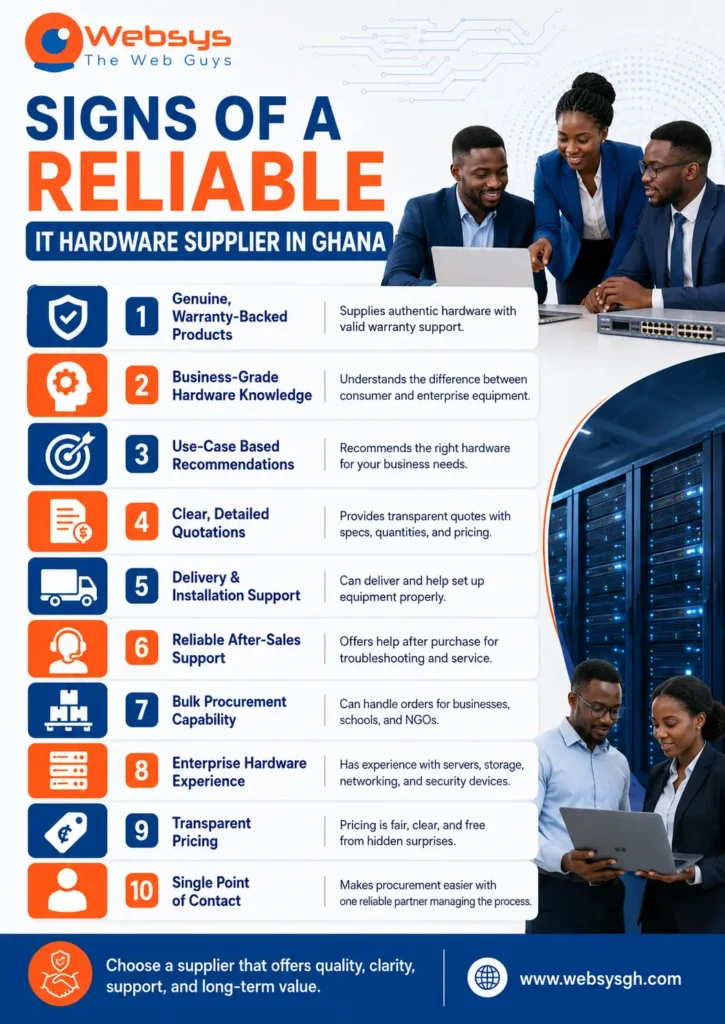
1. They supply genuine and warranty-backed products
Authenticity should always come first. A reputable IT hardware supplier provides you with genuine products and proper warranty documents. That protects you from counterfeit hardware, unsupported warranty claims and grey-market products.
You should always ask for serial numbers and proof of authenticity. Good suppliers will not hide those details. They know trust begins before payment, not after delivery.
This matters even more when you are buying products from HP, Dell, Lenovo, Cisco, APC, Epson, or Canon. These brands are popular for a reason. Still, brand names alone do not guarantee a safe purchase.
2. They understand business-grade hardware
Business hardware is different from home devices. A reliable IT equipment supplier clearly understands that difference. They know that offices need better durability, stability, and support than casual users do.
For example, a consumer laptop may look fine on paper. However, it may not suit daily office workloads. Business laptops, desktops, workstations, servers and networking equipment are designed for heavier use.
That knowledge matters during IT procurement. If a supplier understands business-grade equipment, they can better guide you. You get hardware that fits your team and avoids costly replacements later.
3. They can recommend based on the use case
A good supplier does not push random products. Instead, they ask questions first. They want to know your workload, team size, software needs and budget.
That is how supplier evaluation should work. A school needs different equipment from a logistics company. Likewise, an NGO may need reliable laptops and printers rather than advanced server racks.
This is where smart vendor selection makes a difference. The best supplier recommends devices based on use case, not profit alone. That keeps your spending practical and effective.
4. They provide clear quotations
A proper quotation should leave no doubt. It should list the exact model number, specifications, quantity, warranty and delivery terms. It should also mention installation support where relevant.
Clear quotations make comparison much easier. When suppliers send vague quotes, you cannot compare them properly. Hidden costs may also appear later.
That is why RFQ-based buying is useful. It helps you ask each supplier for the same information. Then you can compare value, not just price.
5. They offer delivery and installation support
Delivery is more than moving boxes from one place to another. A dependable supplier ensures the equipment arrives safely and on time. That matters across Ghana, whether you are in Accra, Kumasi, Takoradi, Tamale, or Tema.
Installation support is just as important. Routers, switches, firewalls, access points, CCTV, printers and servers often need setup. Poor installation can cause problems that appear to be device faults.
A reliable supplier helps you avoid that headache. They make sure the hardware is ready for real use. That saves time and reduces downtime in busy workplaces.
6. They provide after-sales support
The sale should not end the conversation. Good after-sales support shows that a supplier values long-term trust. It also helps when you face setup issues, warranty claims, or troubleshooting problems.
This support can be simple but powerful. Maybe you need help with a printer driver. Maybe a switch needs reconfiguration. Or maybe a laptop arrives with a small issue.
A strong supplier stays reachable after delivery. That is especially useful for Ghanaian businesses that need fast response times. Without support, even a small problem can become a long delay.
7. They can handle bulk procurement
Bulk buying needs structure. It is common for schools, NGOs, businesses and institutions to source many devices at once. That can include dozens of laptops, several printers, or a full office network.
A supplier with bulk procurement experience understands the importance of consistency. They can keep brands, models and configurations aligned. That makes deployment easier and support less confusing.
It also reduces the chance of mixed equipment. When devices all behave similarly, training and maintenance become simpler. That saves time for your team.
8. They have experience with enterprise hardware
Enterprise hardware is not the same as entry-level equipment. Servers, NAS, SAN, firewalls, access points and business networking gear need deeper technical knowledge. They also need proper planning.
A supplier with enterprise experience can handle larger and more complex projects. They know how to match hardware to storage, security and performance needs. That helps businesses avoid weak or mismatched infrastructure.
This is important when your office depends on uptime. If the supplier knows enterprise hardware, you are less likely to face costly errors. In that sense, experience becomes part of the product itself.
9. They are transparent about pricing
Clear pricing builds confidence. A transparent supplier explains what each item costs and why. They do not hide transport charges, tax issues, or installation costs.
That matters because cheap quotes can be misleading. Some suppliers lower the headline price and add extras later. Others may quote hardware that does not match the requested spec.
Transparent pricing helps you compare total value. It also helps with budgeting. When you know the full cost upfront, you can plan properly.
10. They can act as a single point of contact
Managing several vendors can be tiring. A reliable supplier can act as your single point of contact for sourcing, delivery, installation and support. That simplifies the whole process.
This approach reduces confusion. You do not need to chase one vendor for hardware and another for setup. Instead, one accountable partner manages the job from start to finish.
For busy Ghanaian businesses, that can be a huge advantage. It saves time, limits errors and keeps communication clean.
Questions to Ask Before Choosing an IT Hardware Supplier
Before you sign off on any deal, ask the right questions to ensure the supplier is genuine, reliable, and a good fit for your business needs.
Product authenticity questions
Ask whether the products are original and backed by a warranty. Ask for serial numbers and proof of sourcing before you pay. Also ask how they handle defective or disputed items.
These questions protect you from counterfeit hardware. They also show whether the supplier is honest. A trustworthy vendor will answer clearly.
Specification questions
Ask for the exact model number, not a general description. Ask whether the hardware fits your business workload. Also ask if they can suggest a stronger or better-suited alternative.
This matters because small spec differences can significantly affect performance. A laptop with the wrong processor or storage size may slow down your staff. Good supplier evaluation prevents that mistake.
Delivery and installation questions
Ask when the hardware will arrive and where they will deliver. Ask if they offer nationwide delivery or only local delivery. Also ask whether they install and configure the equipment.
For network devices, printers and security hardware, installation support is often essential. Without it, the product may not perform as expected. A reliable supplier should be clear about this.
Support questions
Ask what happens after delivery. Ask how warranty claims work and who you contact. Also ask whether they provide on-site or remote support.
After-sales support is a major part of long-term value. If the supplier cannot support the product later, your risk goes up. Good IT procurement always considers support, not just purchase.
Pricing questions
Ask what the quotation includes and excludes. Ask whether delivery, tax, and installation are included in the price. Also ask if there are any extra charges later.
This keeps hidden costs away. It also makes comparison easier. When every supplier answers the same pricing questions, you get a fairer picture.
IT Hardware Supplier Checklist for Ghanaian Businesses
Use this checklist before making a decision:
| Checklist Item | What to Confirm | Why It Matters |
| Genuine products | The supplier provides original hardware with warranty documents. | Protects you from fake IT equipment and unsupported products. |
| Exact model numbers | The quotation lists clear model numbers and full specifications. | Helps you compare offers accurately and avoid wrong specifications. |
| Business-grade suitability | The hardware is suitable for office, school, NGO, or institutional use. | Ensures the equipment can handle real workloads and daily use. |
| Clear quotations | The quote includes price, quantity, warranty, delivery and installation details. | Reduces hidden costs and simplifies supplier evaluation. |
| Delivery support | The supplier offers reliable delivery across your required location. | Helps avoid delayed delivery and project disruption. |
| Installation support | The supplier can properly install and configure the hardware. | Prevents poor installation and setup issues. |
| After-sales support | The supplier offers post-delivery support, including troubleshooting and warranty claims. | Gives you support when faults or issues appear later. |
| Bulk procurement capacity | The supplier can consistently handle multiple units or large orders. | Useful for businesses, schools, NGOs and institutions. |
| Transparent pricing | The supplier explains all charges clearly before payment. | Helps you compare total costs and avoid hidden costs. |
| Proven experience | The supplier has experience with enterprise hardware and similar projects. | Increases confidence in their ability to deliver reliable results. |
| Product recommendations | The supplier suggests hardware based on your actual use case. | Helps you buy the right equipment for your needs. |
| Physical presence | The supplier has a verifiable business address and reachable contacts. | Improves trust and accountability if problems arise. |
| Authenticity proof | The supplier can provide serial numbers or proof of sourcing when asked. | Confirms the hardware is legitimate and traceable. |
| Warranty process | The supplier clearly explains how warranty claims are handled. | Saves time and frustration if a product becomes faulty. |
| Future growth support | The supplier helps you choose hardware that can scale later. | Prevents early replacement and supports long-term planning. |
This simple checklist can save you from many common mistakes. It also helps schools, NGOs and institutions make stronger buying decisions. In practice, it turns supplier evaluation into a clearer process.
Common Mistakes to Avoid When Choosing an IT Hardware Supplier
Avoiding the following mistakes can save you from costly delays, weak performance and hardware that fails when your business needs it most.
Choosing based on price only
Low price feels attractive. However, it can be expensive later. Cheap equipment may fail sooner or come without support.
In some cases, the lowest quote hides important details. The device may have weaker specs, a poor warranty, or fake components. Always compare value, not just price.
Not checking the exact model number
Some suppliers use broad product names. That can be dangerous. Similar models often have different performance levels.
A small difference in model number can change everything. One laptop may suit office work. Another may struggle with it. Always check the exact model before approving the order.
Buying consumer devices for business use
Consumer devices are not built for office pressure. They may work for light use but fail under the demands of daily business. That can cause frustration and replacement costs.
Business laptops, desktops and workstations are built differently. They often offer better durability and support. For office IT procurement, they are usually the safer choice.
Ignoring networking and security needs
A good office setup needs more than computers. It also needs routers, switches, firewalls and access points. Ignore those and your system may remain weak.
Security hardware matters too. CCTV and access control can protect assets and staff. When planning hardware procurement, always consider the entire environment.
Not asking about the warranty claim process
A warranty is only useful when claims are easy to make. Some suppliers make the process slow and frustrating. Others are clear and responsive from the start.
Ask how claims work before buying. Find out who handles faulty items and how long it takes to resolve them. That small question can save you a major problem later.
Not planning for future growth
Buying only for today is a mistake. Your team may grow. Your software needs may also change.
Choose hardware with future use in mind. That reduces replacement pressure and supports smoother scaling. Smart IT procurement should grow with your organisation.
How to Compare IT Hardware Quotes Properly
Use these steps to compare quotes fairly and choose the option that gives you the best overall value.
Compare product specifications
Always compare the real specifications. Look at the processor, memory, storage, ports and network features. Do not treat different models as equal.
This is where many buyers slip. A cheaper quote may seem better at first. Yet it may offer lower performance or shorter lifespan.
Compare warranty and support
Warranty terms can vary a lot. Some suppliers offer longer coverage. Others provide stronger support or faster replacement.
Do not overlook this part. Support can be worth more than a small discount. It often decides how painful a fault becomes later.
Compare delivery and installation
Delivery speed matters when deadlines are tight. Installation matters when the equipment must work immediately. Compare both carefully.
A supplier with better logistics can save you time. That is useful for offices opening new branches or upgrading systems. Nationwide delivery is often a real advantage in Ghana.
Compare the total cost of ownership
The purchase price is only one part. You should also consider delivery, installation, support and maintenance. That gives you the true cost.
This approach helps you avoid surprises. It also shows which supplier offers better long-term value. In many cases, the best deal is not the cheapest one.
Best IT Hardware Categories to Discuss With a Supplier
Business laptops and desktops
These are the backbone of many workplaces. They support daily tasks, communication and productivity. Brands like HP, Dell and Lenovo are common choices.
Different departments may need different specs. Finance teams may need stronger processors. Admin teams may need stable, reliable systems. That is why use case matters.
Servers and storage
Servers support shared files, business apps and backups. Storage systems like NAS and SAN help keep data safe and organised. They matter a lot in growing businesses.
A supplier should explain capacity, performance and redundancy. They should also help you plan for future storage needs. That prevents rushed upgrades later.
Networking equipment
Reliable networking keeps the office connected. Routers, switches, firewalls and access points all play a role. Without them, even good computers cannot perform properly.
Cisco and Ubiquiti are common names in this space. The right selection depends on office size, traffic and security needs. A good supplier will explain those differences clearly.
Printers and scanners
Many businesses still rely on printed documents. Schools, offices and institutions also need scanning for records and workflows. Epson and Canon are often part of those setups.
The key is reliability. A printer that breaks every week becomes a daily nuisance. A proper supplier helps you choose a model that matches volume and workload.
UPS and power backup
Power backup is essential in Ghana. UPS units protect devices from outages and voltage issues. APC is a familiar brand in this category.
Backup power protects more than hardware. It also protects work in progress. That can prevent data loss and avoid disruption during important tasks.
Security hardware
Security hardware includes CCTV and access control. These tools help protect people, property and sensitive spaces. They are often part of a complete office setup.
Installation quality matters here. Poor setup reduces effectiveness and creates weak points. A reliable supplier should understand that clearly.
Choosing an IT Hardware Supplier for Different Organizations
Different organisations need different hardware priorities, so the right supplier should tailor recommendations to each setup.
For businesses and SMEs
SMEs need practical, scalable solutions. They often want strong performance without wasting money. A good supplier can recommend balanced options.
Business laptops, networking equipment and UPS backup are common priorities. Support also matters because SMEs often have limited in-house IT help. That makes dependable service especially valuable.
For schools and universities
Educational institutions often buy in volume. They also need durable devices that can handle many users. That means supplier consistency matters.
A school may need desktops, printers, storage and networking equipment all at once. Bulk procurement should also include clarity on warranties and support. Otherwise, long-term maintenance becomes difficult.
For NGOs
NGOs usually work with careful budgets. They need value, transparency and dependable delivery. They may also need equipment across several locations.
That makes logistics and support especially important. A supplier should understand practical field requirements. They should also provide clear quotations without confusion.
For government and institutions
Formal procurement needs structure and documentation. RFQs, clear specifications and traceable pricing matter here. So does accountability.
A supplier working with institutions should be organised and transparent. They should also understand procurement expectations and technical standards. That builds confidence from the start.
Red Flags to Watch Out For
Watch closely for these warning signs before you commit, because they often reveal deeper problems with reliability and support.
No warranty documents
The absence of warranty documents is a serious warning sign. It suggests the supplier may not stand behind the product. That increases risk.
Vague product descriptions
If the description is unclear, proceed carefully. Vague wording often hides weak specifications. Good suppliers provide exact details.
No model number in quotation
A quotation without model numbers is incomplete. It makes comparison difficult and creates room for substitution. That can cause trouble later.
Very low pricing without explanation
A price that looks too good may be risky. It could mean poor quality or hidden costs. Always ask why the price is low.
No physical contact or business address
A real supplier should be traceable. If contact details are vague, that is a problem. Accountability matters in IT procurement.
No after-sales support
No support after delivery creates unnecessary risk. Hardware faults happen. When they do, you need a supplier who responds.
No installation or configuration help
Some devices need proper setup. If the supplier offers no help, your team may struggle. That is especially true for network and security equipment.
Poor communication before payment
How they communicate before payment often predicts the future. Slow replies and evasive answers are not good signs. A reliable supplier communicates clearly.
Refusal to provide serial numbers or proof of authenticity
This is a major red flag. It may signal counterfeit hardware or uncertain sourcing. Never ignore that warning.
Conclusion
Choosing a reliable IT hardware supplier in Ghana is about more than buying equipment. You need genuine products, clear quotations and honest advice. You also need delivery, installation, and after-sales support that actually help when problems arise. The best supplier understands business-grade hardware, handles bulk procurement well, and provides the right solution for your use case.
When you compare quotes properly and avoid red flags, your IT procurement becomes safer and smarter. That means fewer mistakes, less downtime and better long-term value for your business. If you want dependable sourcing, practical support and a partner who understands Ghanaian businesses, schools, NGOs and institutions, WebSys Technology’s IT procurement service is a strong place to start. It can help you buy with more confidence and less guesswork.
GET IN TOUCH
Request a consultation!
FAQs
A proper quotation should include exact model numbers, specifications, quantity, warranty terms, delivery details, installation support and total cost. Without those details, comparison becomes unreliable.
No. The cheapest option can hide weak specs, fake products, or poor support. A better choice provides greater value over time and reduces future expenses.
Check the model number, serial number, warranty documents and proof of sourcing. A trustworthy supplier should provide these details without hesitation.
Yes. Good suppliers often help with setup, installation, networking and basic configuration. That ensures the hardware works properly from the first day.
A new office should usually start with business laptops or desktops, a router or switch, a printer, a UPS, and basic security hardware, if needed.