
Your office Wi-Fi is slow, and connections constantly buffer calls and stall uploads. Key culprits include network congestion as devices compete fiercely, wireless interference from microwaves and neighbors, weak router signals through thick walls, and aging hardware unable to handle modern loads. Fixed broadband costs $2.58 per Mbps—the world’s second-highest, according to We Are Social 2025—forcing underpowered plans that amplify business Wi-Fi problems. Internet latency spikes from poor DNS settings hurt, too.
IT experts fix these issues through speed tests across locations, bandwidth management to tame hogs, fresh Ethernet cabling for stability, and enterprise Wi-Fi deployments to boost capacity. They run network optimization and firmware updates, cutting dropped Wi-Fi connections. Your team enjoys consistent network capacity for VoIP and SaaS tools. Local pros navigate NCA rules and outages expertly. Fixing slow office Wi-Fi starts with targeted upgrades.
The Warning Signs Your Office Wi-Fi Problem Is Bigger Than “Just Slow Internet”
You restart the router every morning, yet slow office Wi-Fi drags on during busy hours. These warning signs reveal deeper Wi-Fi problems in the office beyond simple ISP delays, especially in Ghana’s challenging internet infrastructure.
- Frequent dropouts mid-task show deeper trouble. Video calls cut off without warning, and uploads stall completely. In Ghana, 2024 submarine cable disruptions left over 750 offices offline for months, according to The Fourth Estate. IT support for the office network runs signal tests to confirm network stability.
- Speed swings wildly between devices and spots. Your phone loads pages fast while laptops crawl in corners. Dead zones in office areas plague many setups. Ghana’s median fixed broadband speed hits just 33.60 Mbps inland, per iipgh.org data. A Wi-Fi site survey clearly maps these gaps.
- Bills spike with mysterious high data use. Someone is hogging network bandwidth without you noticing. Network congestion in Ghana’s offices mirrors national trends, with 73% of remote workers reporting a 20% productivity loss due to it, according to Boldnet Ghana. Network monitoring spots the culprits fast.
- Overheating routers buzz or feel too hot. Constant strain from network bottlenecks signals overload. Ghana’s power cuts worsen this wear on wireless routers. Professional IT support inspects hardware health before total failure hits your office network, causing slow issues.
What Usually Causes Slow Office Wi-Fi in Ghana
Slow business internet hits Ghana offices hard with unique local twists like pricey broadband and power flickers. Devices overload shared connections while walls block signals easily. Let’s break down the top Wi-Fi problems in office setups you face daily.
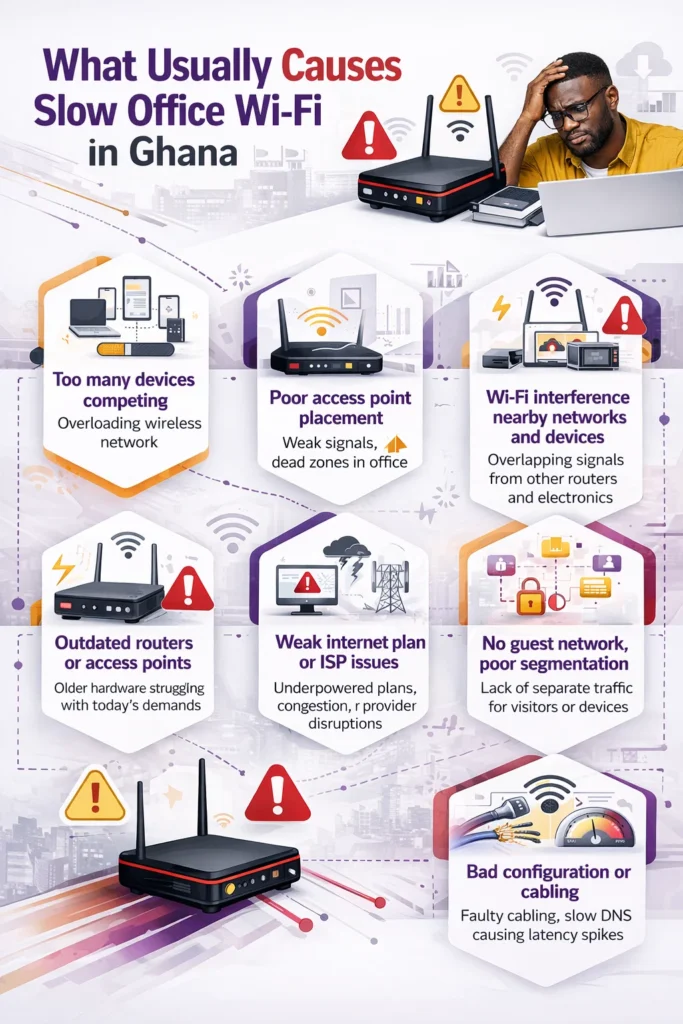
Too many devices are competing for bandwidth
Teams pack 20+ laptops, phones, and printers onto one network constantly. Everyone streams or syncs files during peak hours. Network congestion quickly turns your wireless network into a traffic jam. Nearby Ghana businesses share the same ISP towers, too. This squeezes network capacity for critical tasks like VoIP calls. You notice slow internet during meetings, with voices lagging badly. Smart bandwidth management later effectively eases this strain. Everyone stays productive without constant fights for speed.
Poor access point or router placement
Tuck your wireless router in a corner closet and watch signals fade fast. Thick concrete walls and metal shelves ruthlessly absorb Wi-Fi waves. Inland offices away from Accra are more severely affected by older microwave links. Weak Wi-Fi signal creates frustrating dead zones in office spots like conference rooms. Central spots with clear views spread coverage evenly instead. Test different heights to dodge furniture blocks, too. Proper setup doubles your data throughput without extra hardware costs.
Wi-Fi interference from nearby networks and electronics
Neighboring routers crowd the same 2.4GHz channel nonstop around your building. Microwaves buzz during lunch and jam signals further. Wireless interference halves speeds without warning. Cordless phones and baby monitors pile on the chaos, too. Scan tools reveal these clashes, so you switch channels wisely. Cleaner 5GHz bands handle data better for cloud applications. Your office internet issues lift as connections stabilize right away.
Outdated routers, switches, or access points
Five-year-old gear maxes out at a sluggish 100 Mbps, no matter what. Modern teams demand more for video conferencing and file sharing daily. Network bottlenecks form when hardware can’t keep pace anymore. Firmware lags on security updates, which quietly slow performance. Wi-Fi 6 upgrades pack ten times the capacity for busy Ghana offices. Swap network switches for gigabit models that match fiber plans. Speeds soar, and packet loss drops noticeably across devices.
A weak internet plan or ISP-side issues
A basic 50 Mbps package crumbles under 15 users hitting it at once. Ghanaian ISPs, such as MTN, often experience strain on the national backbone during peak times. Internet latency spikes when lines are congested beyond capacity limits. Demand fiber checks from providers to verify actual delivery rates. Upgrade plans match your team size for reliable network stability. Avoid overpaying for unused speed tiers wisely.
No guest network or poor network segmentation
Visitors jump on your main Wi-Fi and hog network bandwidth from staff instantly. No separation lets them access sensitive files carelessly. VLANs partition traffic, keeping guests completely isolated. Business Wi-Fi problems shrink as core operations run smoothly. Security tightens without slowing down daily workflows either.
Bandwidth-hungry apps like video calls, backups, and file sync
Zoom hogs pipes while OneDrive backups run silently in the background everywhere. Buffering video calls often interrupts client pitches mid-sentence. Schedule syncs for off-hours to fully free daytime capacity. Slow download speeds vanish when you tame these resource pigs smartly.
Bad network configuration, cabling, or DNS issues
Kinked Ethernet cabling starves devices of a steady flow downstream. Default ISP DNS servers lag on every page resolution, too. Inconsistent Wi-Fi coverage stems from misconfigured firewalls blocking ports. Custom DNS, like Google’s, cuts delays in half immediately. Tighten setups for optimal data traffic handling at all times.
How IT Support Diagnoses the Real Cause of Slow Wi-Fi
IT support teams skip wild guesses and dive straight into hard data every time. They bring specialized tools to your office and test every layer methodically. This uncovers hidden flaws in your setup that cause frustrating slowdowns daily. You get clear answers fast instead of endless trial and error.
- Speed tests across multiple office spots reveal true performance gaps. Technicians run iPerf or Ookla tools on laptops in key areas such as meeting rooms and desks. They measure download, upload, and ping rates side by side. Weak spots jump out immediately, so crews know where signals drop off sharply. Compare these numbers to your ISP plan promises for instant red flags.
- Spectrum analyzers scan for interference sources around your space. Tools like NetSpot or Ekahau capture radio waves in real time across 2.4GHz and 5GHz bands. Nearby routers, microwaves, or even fluorescent lights clearly show up as troublemakers. Teams note crowded channels and recommend shifts to cleaner ones right away. Your connections stabilize as clutter clears out naturally.
- Device audits and traffic logs expose bandwidth hogs precisely. Wireshark sniffs packets to track which apps or users consume the most resources constantly. Video streams or cloud syncs brightly light up the dashboard. Crews spot patterns like peak-hour spikes that match your complaints perfectly. This guides smart fixes without disrupting workflows.
- Hardware health checks verify the integrity of routers, switches, and cabling. Experts inspect firmware versions, temperatures, and error logs on every piece of gear. Overheating units or outdated software reveal themselves quickly under scrutiny. They test Ethernet runs for kinks that starve Wi-Fi backhaul, too. Full reports highlight upgrades needed for lasting reliability.
These steps turn vague frustrations into actionable plans within hours, typically. Your team notices smoother flows soon after the pros wrap up their work.
Read more: Common Cybersecurity Problems in Ghana and How to Prevent Them
How IT Support Fixes Slow Office Wi-Fi
IT support pros roll up their sleeves once they spot the trouble spots in your setup. They apply targeted changes that restore smooth connections across your whole office fast. You notice real improvements right away without constant reboots or complaints.
- Access point upgrades now cover every corner evenly. Teams install multiple units high on ceilings for strong signals everywhere. Mesh Wi-Fi systems link them seamlessly, so devices roam without drops. Coverage reaches far into dead zones that plagued you before.
- Channel plans and band steering smooth out traffic flow. Experts pick the least-crowded channels after scans and automatically push devices to faster 5GHz bands. Interference fades as connections lock in stronger. Every day browsing and calls speed up noticeably.
- QoS rules prioritize your key apps. Video calls and cloud tools get top billing over browsing or updates always. Lags vanish mid-meeting, so voices stay clear and steady. Everyone focuses without frustration building up again.
- Hardware swaps and cable refreshes boost raw capacity. New Wi-Fi 6 routers handle dozens of devices without breaking a sweat. Gigabit network switches pair with new Cat6 runs to deliver backbone speed. Your whole network hums reliably for growth.
These fixes last because pros monitor results and tweak as needs change. Your office runs faster, and teams stay productive daily.
Quick Fixes You Can Try Before Calling IT Support
Try these hands-on steps to revive slow Wi-Fi in your office right now. They often solve office Wi-Fi troubleshooting without waiting for pros, despite Ghana’s power hiccups.
- Restart the router and hoist it higher centrally. Clear line-of-sight cuts wireless interference fast. Works in 80% of basic cases.
- Boot extra devices and check your router app. Limit guests to free up network bandwidth. Monitor real-time usage easily.
- Switch DNS to Google’s 8.8.8.8 or Cloudflare. Bypasses Ghana’s common internet latency bottlenecks. Pages load noticeably quicker.
- Manually search vendor sites for the latest firmware updates. Patches fix network stability bugs quietly. Restart after installing carefully.
When It’s Time to Stop Troubleshooting and Call IT Support
DIY tweaks fail after days of trying hard. Persistent business internet connectivity issues demand managed IT services in Ghana’s tricky landscape.
- Speeds stay below 10Mbps no matter what you try. User fixes can’t beat network bottlenecks here. Pros dig deeper always.
- Dropouts hit multiple times every single day. Dropped Wi-Fi connection points to hardware faults. IT infrastructure audit finds root causes.
- Team growth quickly overwhelms your current setup. Network capacity needs professional scaling now. Avoid future office network slowdowns.
- Security alerts pop up, or breaches threaten data. Firewall configuration and network security require experts. Don’t risk it alone.
Read more: Why IT Helpdesk Services Are Crucial for Business Success in Accra
What to Look for in an IT Support Partner for Office Wi-Fi Problems in Ghana
Choose partners who grasp Ghana’s unique office internet issues, such as NCA rules and outages. Local IT support for slow internet delivers reliable enterprise Wi-Fi troubleshooting.
- Deep knowledge of the National Communications Authority’s regulations shines through. They anticipate submarine disruptions proactively. Ghana’s expertise trumps generic firms.
- 24/7 network monitoring tools catch issues early. Alerts prevent downtime before it hits. Network performance monitoring saves hours weekly.
- Proven case studies from Accra offices build trust. Similar Ghanaian businesses fixed mean they understand you. Ask for references confidently.
- Flexible contracts scale with your digital workplace needs. Affordable plans avoid lock-ins forever. Business network setup grows affordably.
Final Takeaway
Slow office Wi-Fi robs your team of focus and growth daily. Ghana’s infrastructure strains, like costly fiber and outages, make experts vital for fixing slow office Wi-Fi. You’ve seen warning signs, common causes, and pro fixes here.
IT support uncovers hidden network congestion, upgrades access points, and sets quality of service for smooth VoIP plus cloud software. Quick tweaks address short-term, yet persistent, office Wi-Fi issues; slow issues require professional IT support. Don’t let slow download speeds or unstable internet connections hold back your digital transformation.
Ready to end frustrating buffering video calls and reclaim productivity? Contact WebSys Technology today for expert IT support for the office network in Ghana. Our specialists perform free Wi-Fi site surveys, deploy Wi-Fi 6 mesh systems for full coverage, and implement bandwidth management tailored to Accra offices.
Enjoy 24/7 network monitoring, rapid outage recovery, and scalable fiber broadband setups starting at budget-friendly rates. Call +233-30-222-3344 now or book your no-obligation audit at [websystechnology.com/audit]. Watch your office productivity soar—act today!