
Ghana faces rising security threats with 628 armed robberies reported by mid-2025 and gun violence surging 253% in early 2025. CCTV camera installation in Ghana delivers proven protection for your home or business right now. This CCTV installation guide for Ghana provides clear steps so you can confidently handle how to install CCTV cameras in Ghana yourself.
Start by gathering tools like 4MP cameras with night vision IR and a UPS backup system for power outages. Next, survey your site for security camera placement to cover blind spots and entrances effectively. Mount units at optimal CCTV mounting height, run Cat6 cable neatly, and set up NVR installation with surveillance-grade hard drive. Connect to your router for remote viewing setup, configure motion detection settings, and test everything thoroughly.
You’ll achieve professional business CCTV installation in Ghana or have reliable CCTV at home in Ghana without extra costs. Follow these steps precisely to launch your surveillance system setup today and deter threats immediately.
Want pro results without the headache?
Contact Professionals for installing CCTV at home in Ghana
Complete CCTV Installation Tools & Materials Checklist
Gather these essentials before starting CCTV camera installation in Ghana for your home or business. This list handles local challenges like frequent power cuts and harsh weather effectively. You’ll avoid delays and ensure lasting results right away.
- HD Cameras (4-8 units): Pick 4MP / 1080p cameras with night vision IR up to 30 meters and IP66 waterproof rating for rain protection. Hikvision or Dahua models excel in Ghana’s dust and humidity while offering a wide dynamic range (WDR) for clear day-night footage and megapixel resolution that captures faces clearly from afar.
- Cabling Needs: Use 100-200m Cat6 cable for sharp video feeds or RG59 coaxial cable with BNC connectors to prevent signal drops during CCTV cable management. Add conduit piping and junction boxes for safe wall runs that thieves can’t easily tamper with.
- Mounting Gear: Sturdy brackets, wall anchors, tamper-proof screws, and a reliable ladder position cameras at CCTV mounting height of 8-10 feet to dodge vandalism common in busy areas.
- Power Setup: UPS backup system (1000VA) or inverter backup provides 6-8 hours against blackouts, paired with a power adapter 12V DC and surge protector to handle voltage fluctuations smoothly.
- Recording Unit: 4/8-channel NVR or DVR setup plus 2-4TB surveillance-grade hard drive like WD Purple supports hard drive installation for DVR with 30-60 day loops.
- Network Tools: PoE switch simplifies PoE camera setup; includes Ethernet crimper and cable tester for flawless connections.
- Hand Tools: Drill bits, multimeter, fish tape, insulated screwdrivers, and zip ties complete safe CCTV wiring guide tasks quickly.
Read more: The Ultimate Guide to CCTV Camera Installation for Small Businesses in Ghana
Step-by-Step CCTV Camera Installation Guide (Home & Business in Ghana)
Launch your CCTV camera installation in Ghana project with this detailed roadmap for homes and businesses alike. These steps tackle challenges for installing CCTV at home in Ghana or business CCTV installation in Ghana, from theft hotspots to unreliable power grids. Build confidence step by step.
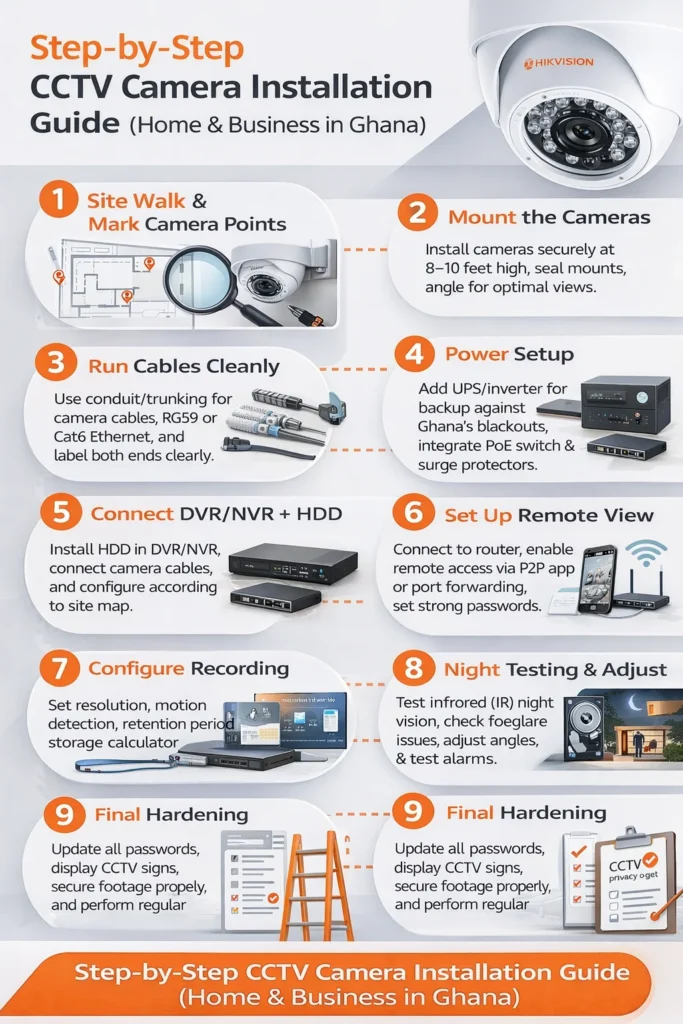
This visual guide summarizes the full installation process from site planning to remote viewing setup.
Step 1 — Do a site walk and mark camera points
Survey your entire property methodically to identify blind spots that criminals exploit. Position cameras for full perimeter coverage around fences, gates, and driveways in high-risk zones like Greater Accra. Mark spots with chalk or painter’s tape at the optimal mounting height of 8-10 feet to capture facial recognition distance up to 15 meters clearly.
Sketch a simple overhead map showing entry/exit monitoring overlaps of at least 30 percent between lenses. For businesses, prioritize shop fronts and back alleys where robberies spike. Walk test paths at different times—day, dusk, night—to simulate intruder routes. This security camera placement foundation prevents overlooked vulnerabilities and maximizes your system’s value from day one.
Step 2 — Mount the cameras properly
Secure your drill and position brackets firmly at marked points on walls, eaves, or poles. Fasten IP66 waterproof rating domes or turrets with rust-resistant screws to withstand Ghana’s heavy rains and coastal salt air. Tilt lenses are precisely for wide-angle sweeps that avoid ground clutter or tree branches blocking views. Maintain camera angle adjustment at 15-30 degrees downward for street-level capture without glare from passing vehicles or the sun.
For business CCTV installation in Ghana, mount over cash registers at 9 feet to deter smash-and-grabs. Shake each unit vigorously after installation to confirm rock-solid stability against winds or impacts. Apply silicone sealant around bases now to block dust and insects effectively.
Step 3 — Run cables cleanly (the part that decides quality)
Map cable paths through attics, conduits, or along gutters before cutting any wires to minimize waste. Push fish tape ahead while feeding Cat6 cable or RG59 coaxial cable through walls and ceilings for hidden, tidy runs. Secure lines with clips every 50cm and bend gently—no sharp kinks that degrade signals during CCTV wiring guide execution. Label both ends clearly, like “Front Gate Cam – NVR Port 1,” for future tweaks.
Connect BNC connectors snugly and crimp Ethernet ends with precision tools. Run a full CCTV cable management test using your multimeter to check continuity and resistance under load. Businesses benefit from armored conduits in public areas to shield against deliberate cuts by vandals.
Step 4 — Power setup (very important in Ghana)
Distribute power feeds from your central panel using thick-gauge wires to each camera location without voltage drops. Integrate a PoE switch for cameras that sip power over data lines, or wire separate power adapters 12V DC units individually. Bolt down your UPS backup system or inverter backup nearby—size it right with backup runtime calculation for a 100W load over 8 hours amid frequent outages.
Install surge protector strips at every junction to absorb grid spikes that fry electronics. Ground all metal parts properly and measure output voltage at the farthest points to stay within 11-13V tolerance. Ghana’s erratic supply makes this UPS for CCTV a step non-negotiable for an uninterrupted surveillance system setup.
Step 5 — Connect DVR/NVR + install surveillance-grade HDD
Position your NVR installation rack in a ventilated, locked cabinet away from direct sun or moisture. Power down, slot the surveillance-grade hard drive into the bays, and secure with screws before booting. Format drives through the interface for optimized 24/7 use with overwrite protection after 30 days. Plug in camera cables to numbered ports matching your site map meticulously.
Scan for devices automatically and assign IPs via the software dashboard. Verify live feeds display sharp megapixel resolution without lag on the preview screen. For larger business CCTV installation in Ghana ops, configure RAID arrays to mirror data against single-drive failures seamlessly.
Step 6 — Connect to your router + set up remote viewing safely
Ethernet your NVR directly to the router’s LAN port for rock-solid broadband stability on MTN or Vodafone fibre. Activate P2P remote access in settings for plug-and-play viewing without complex configs. Set up port forwarding on your router only if needed—ports 80, 554, 37777 typically—and enable DDNS for changing IPs common in residential Ghana.
Download the CCTV mobile app setup on your smartphone, scan QR codes, and link accounts with two-factor authentication. Test the remote viewing setup by stepping outside and streaming live from 1km away successfully. Lock it down further with VPN tunnels to meet the Data Protection Act, 2012 standards on personal data security.
Step 7 — Configure recording settings like a pro
Access the NVR menu and toggle motion detection settings over full-time recording to slash storage needs by 70 percent. Enable H.265 compression and apply the storage calculation formula: (resolution x FPS x retention days x bit rate) divided by compression efficiency. Schedule night-heavy modes since crimes peak after dark, with email/SMS alerts for triggered zones.
Fine-tune sensitivity sliders to ignore pets but catch humans reliably in CCTV recording configuration. Set data retention policy to 30 days per lawful surveillance rules, auto-overwriting old clips. Test by waving arms in view—confirm notifications ping your phone instantly.
Step 8 — Night testing (most people skip this)
Black out rooms or wait for dusk to evaluate night vision IR illumination across full ranges up to 30 meters. Stroll through fields of view at varying distances, noting shadows or washouts from nearby lights. Adjust wide dynamic range (WDR) sliders if headlights overpower scenes during tests. Simulate low-light intrusions like a person approaching gates slowly for realism.
Replay clips frame-by-frame to ensure license plates and faces resolve sharply. This overlooked CCTV troubleshooting catches weak IR LEDs early, vital for Ghana’s frequent evening robberies.
Step 9 — Final hardening
Affix CCTV privacy signage at entrances to comply with Data Protection Commission guidelines on lawful surveillance. Update all firmware to the latest versions blocking known hacks immediately. Program tamper sensors that alert on nudges or covers over lenses. Draft a quick user manual for household or staff covering daily checks and CCTV troubleshooting like reboot sequences.
Schedule bi-monthly tasks: clean lenses, verify motion detection settings, and backup key clips externally. Encase exposed parts in extra junction boxes for ultimate durability in tropical conditions.
Read more: How to Choose the Best CCTV Camera Installation Service in Ghana
Conclusion
You now hold the full blueprint for successful CCTV camera installation in Ghana tailored to homes and businesses. These steps transform vague ideas into a powerful surveillance system setup that counters Ghana’s escalating threats effectively. From precise security camera placement to robust remote viewing setup, your system stands ready against risks like frequent robberies and blackouts. Gain control over your safety without unnecessary expenses today.
For even smoother results, partner with WebSys Technology right away. Our experts deliver turnkey business CCTV installation in Ghana or install CCTV at home in Ghana with free site audits, AI-enhanced motion detection settings, and compliant Data Protection Act features.
Slash theft risks dramatically while enjoying lifetime support and custom UPS for CCTV integrations. Head to https://websysgh.com/contacts, request your no-obligation quote, or call 020-050-8080 now. Secure your world before tomorrow’s uncertainties arrive—act today!
Skip the DIY hassle